Ocarina of Time VR is real, it’s free, and on a Meta Quest 3 or 3S it runs on the headset itself, with no PC or cable once it’s installed. You swing the sword with your arm, hold the shield up to block, and pull the bowstring back with your own hand. In this guide I’ll show you how to install The Legend of Zelda: Ocarina of Time on a Quest step by step, which of the several fan ports to pick, and how the PC VR options (including the new Switch 2 remake mod) compare.
None of this comes from Nintendo. The Quest versions are fan ports of Ship of Harkinian, the community-made PC port of the original N64 game, rebuilt to run natively on Quest hardware. That’s why they run so well: this is the original game’s code, compiled for the headset, not an emulator running in a window.
Ocarina of Time VR at a Glance: Which Version Should You Use?
There are five projects worth knowing. For most Quest owners the answer is the first one in the table.
| Project | Runs on | Game you need | Status | Best for |
|---|---|---|---|---|
| oot-vr | Quest 3 and 3S, standalone | Your own N64 or GameCube dump (Master Quest works) | Beta, updates itself in the headset | Most Quest owners |
| Quest 3: OOT | Quest 3, standalone | Your own N64 dump | Stable, no new builds since September | An easy HD texture setup |
| Shipwright-VR (Ship of Harkinian VR) | PC VR on Windows, plus a newer Quest build | Your own N64 dump | The original VR mod, actively updated | PC VR players |
| Bubbagum88’s build | Quest 1 and Quest 2 (plus a Quest 3, 3S and Pro build) | Your own N64 dump | Small fork, recent releases | Older Quest headsets |
| HookshotVR and OcarinaVR | PC VR only | Nintendo’s Switch 2 remake, one exact version | Early alpha | Remake fans with a fast PC |
Use games you own. ROMs are a legal grey area, so we can’t show you where to find them. Every project in this guide ships without any game files and asks for a dump of a cartridge or disc you own, and none of their developers will send you one.
Is There a Zelda VR Game? Does Ocarina of Time Support VR?
No, not officially. Nintendo has never released a Zelda game for VR headsets. The closest it came was the Toy-Con VR Goggles mode for Breath of the Wild on the original Switch, a cardboard Labo add-on, and the new Ocarina of Time remake on Switch 2 is a flat game.
Every way to play Ocarina of Time in VR today is a fan project. The good ones go well beyond a 3D camera bolted onto the game. Because they’re built on the decompiled source code, the developers could rework how Link fights and how he handles items, so the controls were designed for motion controllers from the start instead of being mapped onto them.
If you own Ocarina of Time 3D on the 3DS instead, our CitraVR Meta Quest tutorial shows how to play 3DS games in the headset. That puts the game on a virtual screen in front of you, though, not in first person.
What You Need to Play Ocarina of Time VR on Quest 3
Here’s the full list for the standalone Quest route, taken from the oot-vr project’s own install notes:
- A Meta Quest 3 or Quest 3S. The developer tests on a Quest 3S, and the Quest 3 uses the same chip. Quest 2 owners should read the Quest 2 section below.
- A PC running Windows, macOS or Linux, and a USB-C cable that can carry data. You only need these for the one-time install.
- A free Meta developer account, so you can turn on Developer Mode.
- SideQuest (Advanced Installer) on the PC.
- A dump of your own Ocarina of Time cartridge or GameCube disc, in one of the supported versions below.
Supported ROM Versions, Including Master Quest
Ship of Harkinian only accepts specific releases of the game, and the Quest ports inherit that list. If your dump isn’t one of these, the setup screen won’t take it.
| Platform | Regions | What works |
|---|---|---|
| Nintendo 64 | North America, Japan | Revisions 1.0, 1.1 and 1.2 |
| Nintendo 64 | Europe | Revisions 1.0 and 1.1 |
| GameCube | North America, Europe, Japan | Ocarina of Time and Master Quest (Japan also adds the Collector’s Edition) |
To check a dump before you copy it over, drop it into the ship.equipment compatibility checker, which compares it against the supported hashes in your browser. If you want to play Ocarina of Time Master Quest in VR, you need the GameCube disc, since that’s where Master Quest was released. oot-vr supports both the original and Master Quest from the same app.
How to Install Ocarina of Time VR on Quest 3 and Quest 3S
These steps use oot-vr, the port I’d recommend for most people because it supports Master Quest, has extra modes, and updates itself from inside the headset after the first install. The other Quest ports install the same way, so you can follow along with any of them.
Step 1: Turn On Developer Mode on Your Quest
- Create a free developer account at developers.meta.com with the same Meta account your headset uses.
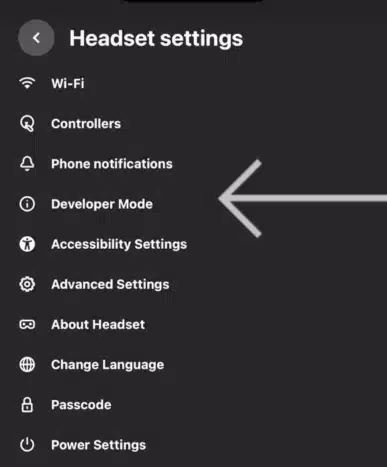
- Open the Meta Horizon app on your phone and go to Devices > Headset settings > Developer mode.
- Switch it on, then restart the Quest.
If you’ve never done this before, our guide on how to sideload onto a Meta Quest walks through it with screenshots.
Step 2: Install SideQuest and Connect Your Quest
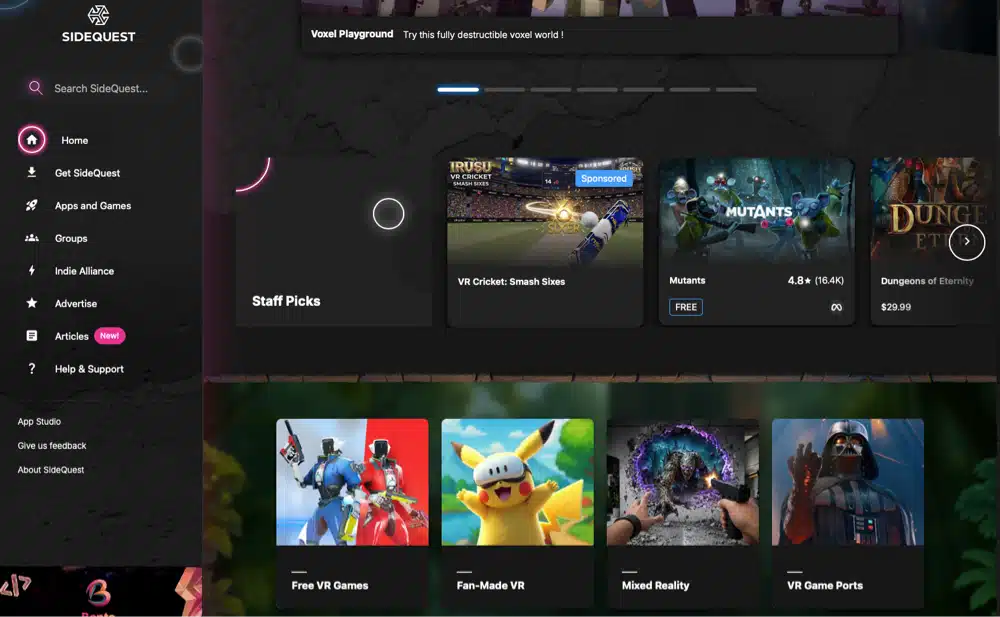
- Install the SideQuest Advanced Installer on your PC from sidequestvr.com.
- Plug the Quest into the PC with the USB-C cable and put the headset on.
- When the USB debugging prompt appears, tick Always allow from this computer and select Allow.
- Back on the PC, wait for the green dot in SideQuest’s top-left corner. That means the headset is connected.
New to SideQuest? Here’s how it differs from the official store: Meta Store vs App Lab vs SideQuest.
Step 3: Download and Sideload the oot-vr APK
- Go to the oot-vr releases page on GitHub and download the latest
oot-vrAPK file. - Drag the APK into the SideQuest window (or click Install APK in the top bar and pick the file). Wait for the install to finish.
There’s also an oot-vr listing on SideQuest with a Sideload now button that installs the same GitHub file straight to a connected headset, if you’d rather skip the download step.
Step 4: Copy Your ROM to the Quest’s Download Folder
- In SideQuest, click the folder icon in the top bar to open the headset’s file manager.
- Double-click the Download folder.
- Drag your ROM file from your PC into the window and wait for the copy to finish.
On Windows you can skip SideQuest for this part: the headset shows up in File Explorer as Quest 3 > Internal shared storage, with the same Download folder.
Step 5: Launch the Game and Build Its Files
- Unplug the cable if you like. In the headset, open Library > Unknown Sources > OoT VR.
- Select Select ROM, then pick your dump in the Download folder.
- Wait a few minutes while it extracts the game data. Keep the headset on, because taking it off can interrupt the process.
- When it asks about mods, select Allow if you plan to add texture packs later. You can skip this and turn it on afterwards.
The game builds its own data file from your dump. After that, you can delete the ROM from the Download folder, and every launch from then on goes straight to the game.
Step 6: Run Quick Setup
Quick Setup asks five things: first-person or third-person view, which hand holds the sword, smooth or snap turning, the item selector or classic C buttons, and where the HUD sits. If you’re not sure, pick first person, your dominant hand for the sword, snap turning and the item selector. Snap turning is the safer starting point if you’re prone to motion sickness, and you can change any of these later from VR Settings.
Ocarina of Time VR Motion Controls on Quest
By default your right hand holds the sword, the boomerang and anything you swing, and your left hand holds the shield, bow, slingshot, hookshot and ocarina. Either hand can grab a bomb, bombchu or Deku Nut from your belt.
| Control | What it does |
|---|---|
| Left thumbstick | Move Link |
| Right thumbstick left, right, down | Put the C-Left, C-Right or C-Down item in your hand |
| Right thumbstick up | Talk to Navi |
| Hold right thumbstick click | Open the item selector, move your hand to an item, release |
| Left trigger | Use the item (for the bow, hold to draw and release to shoot) |
| Right trigger | Z-target |
| Hold both grips | Draw the sword and shield |
| A / B | The N64 A and B buttons (action, talk, roll) |
| Y | Open or close the Ship of Harkinian menu |
| Left Menu button | Start (pause screen) |
The combat is physical. You swing your hand to swing the sword, Deku Stick or Megaton Hammer, and holding the shield in front of you blocks, so the Mirror Shield can bounce Twinrova’s beams back. For a spin attack, rest the sword hand at your hip with the blade pointing back, wait for the controller to buzz, then swing fast.
The practical upshot is that fights stop being about timing a button press and start being about where your arm actually is, which makes early enemies like Deku Babas easier and some later bosses more tiring than they were on a pad.
Best Settings, Modes and Mods for Zelda VR on Quest
Comfort Settings
Ocarina of Time was designed around a camera that swings behind Link, and in first person that becomes your head. If smooth movement bothers you, switch to snap turning, and if it still bothers you, try third person: you get the game’s own camera inside the headset, which feels like sitting in front of a giant screen.
The world scale also changes automatically between child and adult Link, so as a kid the Kokiri Forest really does feel bigger.
Extra Modes: Explore, Boss Rush and Arena
- Explore: start a file as adult Link in the Temple of Time with every item, song and medallion, and just walk around Hyrule. This is the best way to show the game to a friend in five minutes.
- Boss Rush: fight every boss back to back.
- Arena: adult Link fights waves of enemies that get bigger and stronger each round.
HD Texture Packs and Other Mods
oot-vr loads standard Ship of Harkinian mods, so you can swap the N64 textures for HD packs, change models or add translations. Go to VR Settings > Mods > Allow Access first. From there you can download listed mods directly in the headset, or copy a mod file into the Download folder with SideQuest and pick it with Add Mods. Restart the game after adding one. The mods aren’t part of the project, so they come from their own authors.
How to Update oot-vr
With the headset online, oot-vr checks for a new release every time it starts. Select Update when it appears (or go to VR Settings > Update any time), allow installs from this source the first time it asks, and confirm. Your saves stay. This is the main reason I’d pick it over the other ports: you only need the PC once.
Other Ocarina of Time Quest 3 Ports
Several developers ported Ship of Harkinian VR to the Quest at about the same time, so you’ll see different names on SideQuest and Reddit. They all need the same ROM and install the same way.
Quest 3: OOT (ChocoTorp’s Shipwright-VR Port)
This was the first standalone Quest 3 port, and its install guide is the most hand-holding of the bunch. It finds your ROM anywhere on the headset, whatever the file is called, and the first launch shows loading dots for one to two minutes while it builds the game. Its standout feature is the texture pack support: drop the popular 3DS-style HD pack into the SOHVR/mods folder and it compresses the pack for the Quest on its own, which takes about three minutes, then asks for one restart. The pack also replaces the flat pre-rendered rooms (Link’s house, the Market, the shops), which otherwise show up as green backdrops in VR.
It runs at the Quest’s 72 Hz and redraws the 3D world every other frame by default to keep busy areas smooth. If you want fully smooth animation, set VR Settings > Performance > Stereo Render Divisor to 1. It hasn’t had a new build since September, though, and it doesn’t update itself, which is why it’s my second pick.
Get it from the Quest 3: OOT releases page.
Ship of Harkinian VR for Meta Quest (ShinyWindow’s Original)
ShinyWindow wrote the original Ship of Harkinian VR mod for PC, and the releases page now includes a Quest APK too. It has the deepest list of physical interactions of any version: you climb ladders and vines by hand, scoop fairies into a bottle and shake it to pour, hold the Lens of Truth or a mask up to your face to wear it, and cast Din’s Fire by holding both triggers.
The latest Quest build is marked as a pre-release and the install notes are written mainly for PC, so I’d treat it as the one to try once you’re comfortable sideloading. It’s on the Shipwright-VR releases page.
Ocarina of Time VR on Meta Quest 2
The main Quest 3 ports list only newer headsets in their app manifest, and an older headset won’t launch an app that names hardware it doesn’t recognize. Bubbagum88’s build fixes that with a separate APK for the Quest 1 and Quest 2, plus one for the Quest 3, 3S and Pro, and adds extras like a charged spin attack and a physics-rope hookshot cheat. Two things to know: each release is signed with a test key, so uninstall the old version before installing a new one (saves in the SOHVR folder are kept), and the developer doesn’t publish Quest 2 performance figures. With the Quest 2’s older chip, expect it to run rougher than on a Quest 3.
How to Play Ocarina of Time VR on PC (Ship of Harkinian VR)
If you have a gaming PC, ShinyWindow’s Ship of Harkinian VR gives you the original N64 game with sharper rendering and the full physical-items feature set, using any SteamVR headset, or a Quest streaming from the PC.
- Download the latest Windows zip from the Shipwright-VR releases page and extract it.
- Start SteamVR with your headset connected. Quest owners can use Meta Quest Link, Steam Link or Virtual Desktop to get into SteamVR.
- Run
soh.exeand point it at your ROM when asked. It builds its game data from the dump the first time. - Keep the graphics backend on DirectX 11. The project’s own notes say VR doesn’t work with OpenGL.
The developer’s recommended settings are a good starting point: turn on Disable 2D Pre-Rendered Scenes and Disable Fixed Camera under Enhancements, Hide Link’s Body under VR Settings, and Physical Combat, which makes the sword a real object that can’t pass through walls or enemies. Most other things can be tuned under VR Settings > Calibration.
Ocarina of Time Remake VR Mod: HookshotVR and OcarinaVR
If you’ve seen videos of the new Ocarina of Time remake in VR, with the redone Kokiri Forest and Hyrule Field, that’s a different thing entirely. Nintendo’s remake came out on Switch 2 on November 5 ($59.99 digital). Soon after launch, a fan project called Hookshot recompiled it to run natively on PC, and two VR mods were built on top of it:
- HookshotVR adds first-person, third-person and a “window” view, Link’s hands, a wrist HUD and a launcher that builds everything for you. It’s the one most gameplay videos show. Hold the left Menu button or Y for half a second to open its VR menu.
- OcarinaVR does a similar first-person conversion on Windows, with Link’s fingers following yours. Its developer tested it on a Quest 3 over a Link cable.
Ocarina of Time Remake VR Requirements
- A PC VR headset with an OpenXR runtime (SteamVR, Meta Quest Link, WiVRn and others). There’s no standalone Quest version.
- A graphics card with Vulkan 1.3 and mesh shaders: NVIDIA RTX 20 series, AMD RX 6000 series, Intel Arc or newer. That cutoff is a feature requirement, so an older card won’t run it at all, however fast it is. Turn on Resizable BAR, because VR can run out of graphics memory without it.
- A CPU with AVX2, 16 GB of RAM, and about 60 GB of free space while the game builds. The first build takes from half an hour to a couple of hours.
- Your own copy of the Switch 2 remake, at the one exact game update the project supports (the requirements list on its GitHub page names it).
Nintendo doesn’t sell the remake on PC, and there’s no official way to copy a Switch 2 game off the console, so getting a usable copy means dumping it from your own modified Switch 2. We won’t cover that here. It’s also a fragile setup to build on: Hookshot’s original GitHub account is gone, and the project now lives on its developer’s own server.
Both mods are early alphas.
HookshotVR shows both eyes the same image by default (its true stereo mode can leave grass and leaves white), it mainly targets the child Link part of the game, and some items like Deku Nuts, Bombchus and the magic spells still run through regular buttons. On Meta’s own PC runtime (Quest Link and Air Link), some players get a doubled, flat picture with no confirmed fix yet, so if that happens to you, switch your OpenXR runtime to SteamVR. For playing Ocarina of Time in VR today, the N64 version on a Quest is the more complete experience. I’d keep an eye on the remake mods and come back once they leave alpha.
Ocarina of Time VR Not Working? Common Fixes
- Stuck on loading dots on first launch: that’s normal. The game is building its data from your ROM, which takes one to a few minutes. Leave the headset on and wait.
- The game doesn’t find or accept your ROM: check it’s in the headset’s Download folder and that it’s a supported version. Run it through ship.equipment. A dump of an unsupported revision won’t work, however you rename it.
- You can’t find the app: sideloaded apps live under Library > Unknown Sources, not with your store games.
- The new APK won’t install over the old one: builds signed with different keys can’t overwrite each other. Uninstall the old version first. Your saves in the SOHVR folder stay put.
- Green backdrops in Link’s house, the Market or shops: those rooms were flat pictures in the original game. Add the 3D room files from an HD texture pack on Quest, or turn on Disable 2D Pre-Rendered Scenes on PC.
- A gray rectangle during scene transitions, or distant objects vanishing when you look straight at them: both are known oot-vr bugs, not a problem with your setup.
- A flat or doubled image with the remake mods on Quest Link: switch the active OpenXR runtime to SteamVR and launch again.
Is Ocarina of Time VR Worth It?
Yes, if you own the game and a Quest 3 or 3S. Twenty minutes of setup gets you the whole adventure, from Kokiri Forest to Ganon, running natively on the headset with motion controls that change how the fights feel. It’s a beta, so save often and expect the odd visual glitch, but the core game works.
If you only have a Quest 2, it’s still worth trying with the older-headset build, just with lower expectations on smoothness. And if you’re here for the Switch 2 remake in VR, I’d wait: the PC mods are impressive alphas, but the requirements are steep and the way you get a copy is the hard part.
FAQ
Is Ocarina of Time VR free?
Yes. oot-vr, Quest 3: OOT, Ship of Harkinian VR and the remake mods are all free fan projects. What you supply is the game itself: a dump of your own Ocarina of Time cartridge or disc, or for the remake mods, your own copy of the Switch 2 game.
Can you play Ocarina of Time standalone on Quest 3?
Yes. oot-vr and Quest 3: OOT run natively on the Quest 3 and 3S with no PC, cable or streaming. You need a PC once, to sideload the app with SideQuest and copy your ROM over. After that, it plays like any other app in your library.
Can I play Zelda VR on Meta Quest 2?
The main ports target the Quest 3 and 3S. Bubbagum88’s build has a separate APK for the Quest 1 and Quest 2, installed the same way with SideQuest. Its developer doesn’t publish Quest 2 performance figures, so expect it to run less smoothly than on a Quest 3.
Does Ship of Harkinian VR support Master Quest?
Yes, in oot-vr. Master Quest came out on GameCube, so you need a dump of the GameCube disc (North American, European or Japanese). The same app plays both the original game and Master Quest.
Can I play the Ocarina of Time remake in VR on Quest 3?
Not standalone. The remake VR mods, HookshotVR and OcarinaVR, run on a PC with a recent graphics card and stream to the headset, for example over Quest Link or SteamVR. They also need your own copy of the Switch 2 remake at one exact version, and there’s no official way to get that off the console.
Where can I download Ocarina of Time VR?
From each project’s official GitHub releases page: oot-vr, Quest 3: OOT and Ship of Harkinian VR. oot-vr is also listed on SideQuest. None of them include the game, and you should never download an APK from a site that claims to bundle the ROM.
Can you play Ocarina of Time VR on the Steam Frame?
The simplest route is the PC version. Ship of Harkinian VR runs through SteamVR on a Windows PC, which you can stream to the headset. HookshotVR’s notes say it has no Steam Frame controller layout of its own yet, so the remake mod may need manual control setup.
How do I play other N64 games on Quest 3?
Ocarina of Time is unusual because it has a full native port. For other N64 games you’d normally use an emulator, which shows the game on a flat virtual screen rather than in first person. Our guide to Meta Quest VR emulators covers the options.
Are these Zelda VR ports legal?
The ports are unofficial fan projects, not affiliated with Nintendo, and they ship no game files. Every developer asks you to use a dump of a game you own, and none of them provide ROMs. Downloading a ROM of a game you don’t own is piracy, so stick to your own cartridge or disc.
Final Thoughts
Ocarina of Time VR on the Quest 3 is one of the best fan ports I’ve seen on the platform, and it’s free if you already own the game. Start with oot-vr, keep your ROM dump handy for the first launch, and turn on snap turning if Hyrule Field makes you queasy. If you get the bug for more, our list of the best VR mods and the best SideQuest VR games are good next stops, and if Zelda on other hardware is your thing, here’s how to run Zelda: Tears of the Kingdom on Steam Deck.