In this guide, we’ll show you how to download, install, and load Beat Saber custom songs into the game. This guide has been fully updated for 2026 to include:
- the current ModsBeforeFriday (MBF) method for Meta Quest, now that BMBF no longer works
- step-by-step PC VR instructions using BSManager
- what changed with Developer Mode setup on Quest
- How to update everything to the latest version when a new Beat Saber version is released
- The best custom songs to load into the game.
Comment at the bottom of this guide if you have any problems with this Beat Saber mod not working or need help loading new songs into the game.
What are Beat Saber Custom Songs?
There are multiple communities on the internet dedicated to mapping real songs to Beat Saber. This means that you can play the latest Taylor Swift, Drake, Marshmello, or Five Finger Death Punch songs in Beat Saber.
Doing this allows your Beat Saber song list to grow into hundreds of real life tracks easily! This is one of the reasons why the game is one of the most popular Oculus apps of all time.
Being able to load custom Beat Saber songs onto your headset is made possible by community modding tools. On Meta Quest, that’s ModsBeforeFriday. On PC, it’s BSManager. Both let you browse custom songs from sites like BeastSaber and BeatSaver, save the ones you like, and get them onto your headset.
What is Song Downloader Beat Saber?
SongDownloader is a mod that gets installed automatically when you mod Beat Saber with ModsBeforeFriday. It lets you browse and install songs from directly inside the game, so there’s no separate step to sideload song files.
Do Custom Songs Work in the Latest Version of Beat Saber?
In 2022 and before, mods needed to be updated for each individual version of Beat Saber that was released. This was time consuming for the modders and confusing for VR gamers who had to wait for custom song support.
Now, Beat Saber custom songs work in all new versions of Beat Saber. Song Downloader is a core mod for the game now and by following the instructions below, you will install all core mods.
Requirements to Install Beat Saber Custom Songs
In order to get real life songs onto your Meta Quest headset, you need the following:
- Meta Quest VR headset (obviously)
- A Windows or Mac computer running Microsoft Edge or Google Chrome
- A USB cable and Developer Mode enabled on your headset (covered below)
How to Install Beat Saber Custom Songs (New)
Installing custom songs on your Meta Quest now goes through ModsBeforeFriday (MBF), the tool that replaced BMBF. If you tried the old BMBF steps and got stuck, that’s why: BMBF no longer works for modding Beat Saber on Quest 2 or Quest 3. Before you start, it’s worth backing up your existing Beat Saber saves and playlists in case you ever need to restore them.
- Enable Developer Mode on your Quest
- Mod Beat Saber with ModsBeforeFriday
- Browse and install custom songs in-game
Enable Developer Mode
Before ModsBeforeFriday can talk to your headset, you need Developer Mode turned on, and that means becoming a registered Meta developer first. If you don’t already have a developer account, you’ll need to create or join a developer Organization at Meta’s developer site. As part of that process, Meta may ask you to set up two-factor authentication on your account.
Once you’re set up, open the Meta Horizon app on your phone, tap the headset icon in the toolbar, select your Quest, tap Headset Settings, tap Developer Mode, and toggle it on.
Connect your headset to your computer with a USB-C cable, put the headset on, open the Quick Control menu, tap the gear icon for Settings, open the Developer tab, and toggle MTP Notification on. When the “Always allow from this computer” prompt appears, approve it. Also make sure your headset only has one account signed in. MBF can’t mod Beat Saber if there’s more than one.
Mod Beat Saber with ModsBeforeFriday
MBF runs entirely in your browser, so there’s nothing to install on your PC. It only works in a Chromium-based browser like Microsoft Edge or Google Chrome. It will not work in Firefox or Safari.
- Keep your Quest connected to your computer with the USB cable
- Go to the ModsBeforeFriday website in Edge or Chrome
- Click Connect to Quest and put your headset on to approve the connection
- If prompted, let MBF downgrade Beat Saber to the latest moddable version (or see our manual downgrade guide if that step fails)
- Click Mod the app and wait for it to finish. Don’t disconnect the cable while it’s working
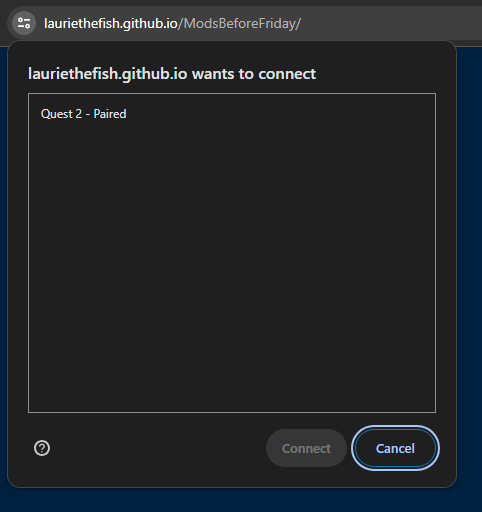
MBF installs the SongDownloader mod automatically, so you’re ready to add custom songs as soon as it’s done. You can add more community mods later from the “Add mods” option in MBF’s menu. One tradeoff worth knowing about: modding disables Beat Saber’s official multiplayer and leaderboards.
![How to Install Beat Saber Custom Songs [Step by Step Tutorial]](https://arvrtips.com/wp-content/uploads/2026/08/image-2-1024x730.png)
Browse and Install Custom Songs to Beat Saber
Launch Beat Saber and you’ll see a Mods screen on the left side of the menu.
Open the SongDownloader tab. It has a search bar and filters so you can browse songs from BeatSaver right inside the game and download them with one tap.
Prefer browsing on your computer first? You can also find songs on BeastSaber or BeatSaver, and sync your headset the next time you open MBF.
Running into a problem? Comment at the bottom of this guide with the version numbers you’re working with, and we’ll do our best to help.
How to Install Beat Saber Custom Songs on PC (Steam & Oculus)
PC VR modding works the same way whether Beat Saber is running through Steam or the Oculus PC app. The current tool is BSManager. ModAssistant, the older installer, is now considered legacy software with known bugs, so it’s no longer the one to reach for.
- Make sure you own Beat Saber on Steam or Oculus PC, and have launched it at least once
- Download BSManager from its GitHub releases page
- Open BSManager and let it detect your Steam or Oculus install
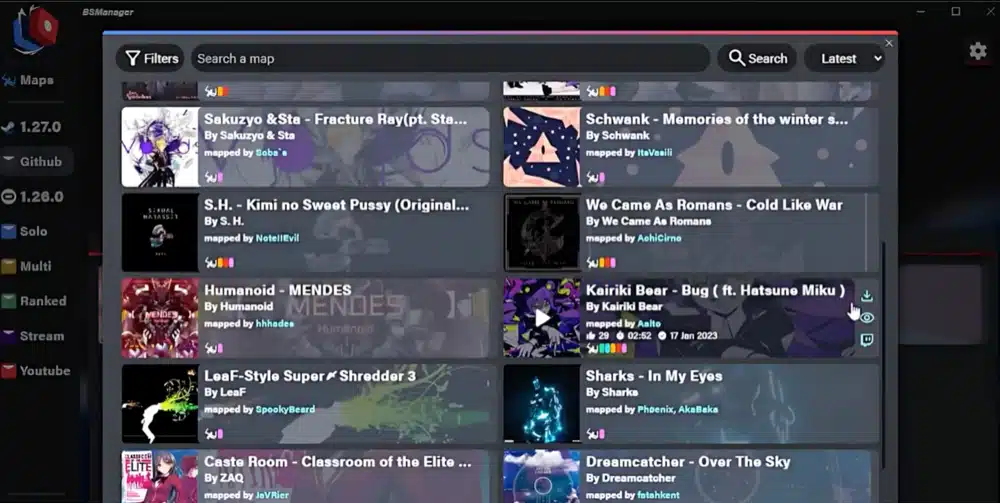
- Use BSManager’s Maps tab to browse and install custom songs, or install the BeatSaverDownloader/BetterSongSearch mod to pull songs from BeatSaver without leaving the game
BSManager also handles version downgrades and mod updates going forward, so you shouldn’t need a separate tool to keep your PC mods working after a Beat Saber update.
List of the Best Beat Saber Custom Songs
The songs below are the most popular real world songs for Beat Saber that fans have loaded into the game.
You can find custom songs on the Bsaber website or through the Mods section in Beat Saber and sync them to your headset using the instructions above.
- PSY – Gangnam Style (https://bsaber.com/songs/141/)
- Electric Light Orchestra – Mr. Blue Sky (https://bsaber.com/songs/570/)
- The White Stripes – Seven Nation Army (https://bsaber.com/songs/3fc/)
- Imagine Dragon – Believer (https://bsaber.com/songs/1fef/)
- Walk the Moon – Shut Up and Dance (https://bsaber.com/songs/2144/)
- Avicii – The Nights (https://bsaber.com/songs/462/)
- PSY – Daddy (https://bsaber.com/songs/133b/)
- Muse – Uprising (https://bsaber.com/songs/4c6/)
- Earth, Wind & Fire – September (https://bsaber.com/songs/480/)
- Skillet – Feel Invincible (https://bsaber.com/songs/121f/)
- Daft Punk – Technologic (https://bsaber.com/songs/747/)
- The Weeknd – Blinding Lights (https://bsaber.com/songs/8553/)
- Rammstein – Du Hast (https://bsaber.com/songs/18cc/)
- Panic at the Disco – The Greatest Showman (https://bsaber.com/songs/2087/)
- Joey Batey – Toss a Coin to Your Watcher (https://bsaber.com/songs/7a64/)
- Mark Ronson – Uptown Funk (https://bsaber.com/songs/5038/)
- Eminem – Love the Way You Lie (Feat. Rihanna) (https://bsaber.com/songs/462/)
- Dua Lipa – New Rules (https://bsaber.com/songs/bd3/)
- Fun. – Some Nights (https://bsaber.com/songs/efe/)
- Boney M – Rasputin (https://bsaber.com/songs/fd/)
- AC/DC – Back in Black (https://bsaber.com/songs/9d7/)
- Darude – Sandstorm (https://bsaber.com/songs/849a/)
- Twenty One Pilots – Stressed Out (https://bsaber.com/songs/5e81/)
- Justin Timberlake – Can’t Stop The Feeling (https://bsaber.com/songs/45e/)
- Halsey – Without Me (ILLENIUM Remix) (https://bsaber.com/songs/23c3/)
How do you create your own Beat Saber maps?
If you’d like to create maps for your favorite songs in Beat Saber, there are a number of resources you can check out. The Beat Saber Mapping Guide is a wikipedia style resource that tutorials for everything you need.
You can learn how to create your own maps, mod Beat Saber, and do a ton of other cool things. It’s our favorite custom modding group resource for Beat Saber.If you prefer video tutorials, check out this series from Fruhead which walks you through step-by-step creating your own maps.
Beat Saber Custom Songs Mod FAQs
What is the best way to load custom songs in Beat Saber?
ModsBeforeFriday (MBF) installs the core mods you need for Beat Saber, including SongDownloader, which lets you browse and download real-life custom songs from inside the game.
Are Beat Saber custom songs illegal?
No, downloading and playing custom songs in Beat Saber is not illegal. For personal use, it is completely fine to use the steps above installing mods for Beat Saber and getting new songs.
Does Mapping Extensions work with the latest version of Beat Saber?
Mapping Extensions to NOT work with the latest version of Beat Saber. Mapping Extensions is a Beat Saber mod that makes it easier for mappers to create their own custom songs. Maps created with Mapping Extensions require the user to have that mod installed on their headset in order to work. These versions are now obsolete and old. So if you keep your Beat Saber up to date, then do not download any songs that require Mapping Extensions
Are songs free on Beat Saber?
All custom songs for Beat Saber are free to download and try out. Beat Saber also releases official music packs from real life artists for an additional fee.
Can you put custom songs on Beat Saber PlayStation (PS4/PS5)?
Unfortunately, Sony does not allow you to load custom songs onto Beat Saber for the Playstation 4 or Playstation VR.
Why is Beat Saber so fun and popular?
Beat Saber is one of the highest selling VR games of all time. It is fun and popular for a few different reasons: gameplay is fun to learn but hard to master and it is extremely satisfying to chop blocks and get into the rhythm of the beat. Loading custom songs into Beat Saber increases the fun level as well.
Do you have any other Beat Saber questions? Comment below and let us know and we will do our best to answer them for you.