

Do you want to pair your Ray-Ban Meta glasses with some useful accessories? In this guide, I’ll show you the best Ray-Ban Meta accessories you can buy today, from charging stands and replacement cases to lenses, nose pads, and straps.
I’ve also checked which ones fit the new Ray-Ban Meta Gen 3, because a lot of older accessories don’t.
What Are the Best Ray-Ban Meta Accessories?
- Meta Glasses Charging Stand (Best for Gen 3)
- Ray-Ban Meta Charging Dock (Best Budget Charging Dock)
- Nillkin RayDock (Best Dock for the Charging Case)
- Official Ray-Ban Meta Charging Case (Best Replacement Case)
- theXuit Charging Port (Best for Charging While You Wear Them)
- Sarlar Hard Carrying Case (Best Travel Case)
- Lensology Custom Lenses (Best for Prescription and Transitions)
- SmartVLT Replacement Lenses (Best Budget Replacement Lenses)
- Silicone Replacement Nose Pads (Best for Comfort)
- HiBloks Thick-Temple Glasses Strap (Best for Sports)
- Hexagrid Side Shields (Best for Outdoor Glare)
Which Ray-Ban Meta Accessories Fit Gen 1, Gen 2 and Gen 3?
Check this before you buy anything. Ray-Ban Meta Gen 3 launched in September 2026 with new Aviator and Zena frames, and Meta’s own Gen 1 and Gen 2 charging case is listed as not compatible with Gen 3. Most third-party accessories only list the older Wayfarer, Skyler and Headliner frames so far.
| Accessory | Gen 1 | Gen 2 | Gen 3 | Notes |
|---|---|---|---|---|
| Meta Glasses Charging Stand | Yes | Yes | Yes | Also Oakley Meta HSTN and Meta’s own glasses; not Display or Vanguard |
| Ray-Ban Meta Charging Dock | Yes | Yes | Yes | Wayfarer, Headliner, Skyler, Oakley Meta HSTN |
| Nillkin RayDock | Yes | Yes | Yes | Holds the charging case |
| Official Ray-Ban Meta Charging Case | Yes | Yes | No | Not for Optics styles, Display, or Oakley Meta |
| theXuit Charging Port | Wayfarer, Headliner | Wayfarer, Headliner | Not listed | Generation not specified by the maker |
| Sarlar Hard Carrying Case | Yes | Yes | Yes | Sized for the Wayfarer/Skyler/Headliner case |
| Lensology Custom Lenses | Yes | Yes | Check with Lensology | Ray-Ban Meta and Oakley Meta |
| SmartVLT Replacement Lenses | Yes | Yes | Yes | Wayfarer, Skyler, Headliner, Blayzer/Scriber Optics |
| Silicone Replacement Nose Pads | Wayfarer | Wayfarer | Warfarer | |
| HiBloks Glasses Strap | Yes | Yes | Yes | Also Meta Adventurer/Fury and Oakley Meta HSTN |
| Hexagrid Side Shields | Wayfarer | Wayfarer | Wayfarer |
Best Ray-Ban Meta Wayfarer Accessories
The Wayfarer is the most popular Ray-Ban Meta frame, so it has the widest choice. Every pick on this list lists Gen 1 or Gen 2 Wayfarer support except Lensology, which asks for your exact model when you order.
If you have a Gen 3 Wayfarer, consider sticking with Meta’s charging stand. Third party options should confirm their support over time.
Meta Glasses Charging Stand (Best for Gen 3)
Meta’s own charging stand is the simplest way to charge your glasses overnight. You set the glasses into the slot and the contact points do the rest, with no charging case needed. Meta says it reaches 50% in about 20 minutes and a full charge in just over an hour.
It’s also the one accessory on this list that Meta confirms for Ray-Ban Meta Gen 3, including the new Aviator and Zena frames. The stand is stainless steel with a silicone base, and it works with Gen 1 and Gen 2 Ray-Ban Meta, Oakley Meta HSTN, and Meta’s own glasses line too, so it’s a good pick for a household with more than one pair.
Charging Stand Key Features
- Direct charging: the glasses charge on the stand itself, so you don’t have to open the case every night.
- Fast top-ups: about 50% in 20 minutes, according to Meta.
- Wide compatibility: Ray-Ban Meta Wayfarer, Aviator, Zena, Skyler, Headliner, Blayzer Optics and Scriber Optics, Oakley Meta HSTN, and Meta Capri, Nova, Adventurer, Starfire and Fury.
- USB-C input: plugs into a standard USB-C cable and wall adapter.
Charging Stand Price and Compatibility
The stand costs $59 in the US. It isn’t compatible with the Meta Ray-Ban Display or Oakley Meta Vanguard, and the USB-C cable and wall adapter aren’t included.
Charging Stand Pros
- Official Meta accessory, confirmed for Gen 3
- Charges the glasses directly
- Works across most Meta glasses in the same home
Charging Stand Cons
- No cable or wall adapter in the box
- Doesn’t work with the Display or Oakley Meta Vanguard
- Costs more than third-party docks
Click here to buy the Meta Glasses Charging Stand.
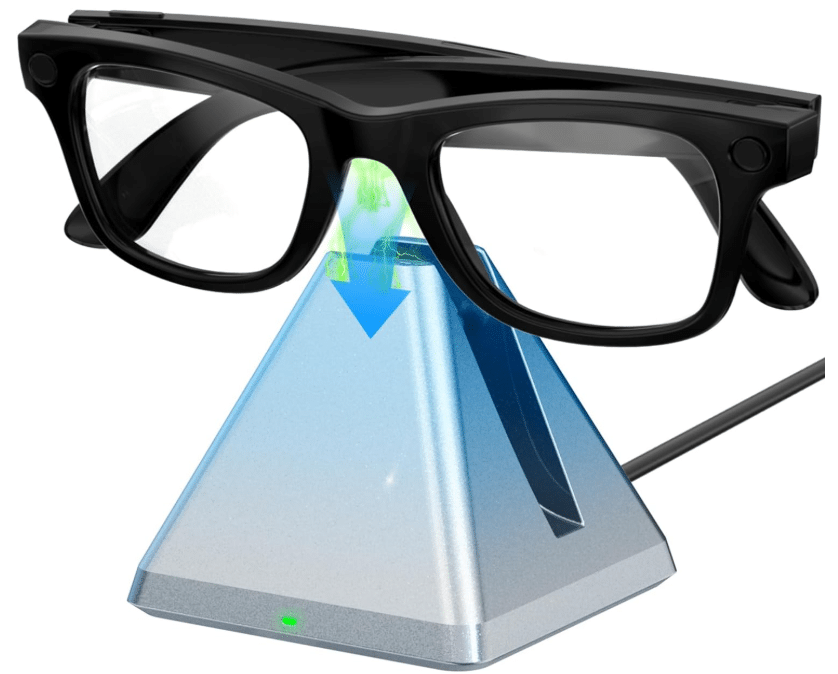
Ray-Ban Meta Charging Dock (Best Budget Charging Dock)
This charging station is best used as a dedicated charging zone for your Ray-Ban Meta glasses wearable device at the end of each day. Instead of fumbling with cables or the standard charging case on your nightstand, this station lets you place the glasses and walk away.
I like that this charger keeps the glasses upright and ready for use. You always know that first thing in the morning, they’re charged and good to go. It also keeps them secure and saves wear and tear on the original case.
Charging Dock Key Features
- Easy Dock-In: The glasses snap into place, eliminating the uncertainty of whether they are actually plugged in and reducing connector strain.
- LED Charging Indicator: A visible light on the charging station indicates charging status (charging vs. full), so I don’t have to open the case or check the app to know whether they’re done.
- Increase Durability: The station’s design keeps the glasses upright and secure on my desk or nightstand, helping them last longer than when tossed in a pouch.
- USB-C/Universal Input Compatibility: Since it uses a standard cable port, it’s easy to integrate with other chargers I own, making travel and usage more convenient.
- Stylish and Minimal Design: It blends with the Ray-Ban Meta glasses’ design (which themselves look like regular sunglasses) rather than resembling a tech gadget.
Charging Dock Price and Compatibility
This dock was about $25 on Amazon when I checked. It’s listed for the Ray-Ban Meta Wayfarer, Headliner and Skyler plus the Oakley Meta HSTN, but it doesn’t list Gen 3 or the new Aviator and Zena frames.
Charging Dock Pros
- Much cheaper than Meta’s official stand
- LED shows charging status at a glance
- Keeps the glasses upright and secure
Charging Dock Cons
- Not listed for Gen 3 frames
- Third-party build, so there’s no Meta warranty
Click here to buy the Ray-Ban Meta Charging Dock.
Nillkin RayDock (Best Dock for the Charging Case)
If you’d rather keep your glasses in their case overnight, the Nillkin RayDock gives the Ray-Ban Meta charging case a proper home on your desk. It’s an aluminum stand the case sits in, powered over USB-C, so you’re not fishing for a loose cable every evening.
Nillkin says a full case charge takes about 2 hours, the same as the official charger, with about 50% in 22 minutes. Once the case is full, the dock switches to trickle charging. Tap the desk twice and a soft light shows whether it’s still charging or done.
RayDock Key Features
- Aluminum build: anodized aluminum with an anti-slip base.
- 7W charging: charges the case at about the same speed as Meta’s own charger.
- Touch wake-up light: tap the desk to check status without picking anything up.
- Trickle charging when full: designed to protect the case battery.
RayDock Price and Compatibility
Nillkin lists it at $35.99 (regular price $49.99). It fits the original charging case for Ray-Ban Meta Wayfarer (standard and large), Skyler and Headliner, Gen 1 and Gen 2. It doesn’t list the Gen 3 case. If you’d rather charge the glasses without the case, or you own Gen 3, Meta’s stand is the better fit.
RayDock Pros
- Premium aluminum look on a desk
- Charges the case as fast as Meta’s charger
- Easy status check with a tap
RayDock Cons
- Only for the Gen 1 and Gen 2 charging case
- Needs your own USB-C cable and adapter
Click here to buy the Nillkin RayDock.
Official Ray-Ban Meta Charging Case (Best Replacement Case)
If your charging case is lost, cracked, or no longer holds a charge, the safest fix is Meta’s official replacement. It’s the same case that came with the glasses, and a full case gives Gen 2 glasses up to 48 hours of extra charging (up to 32 hours for Gen 1).
You can buy it on Meta’s store or through Ray-Ban’s After Sales Portal, where you choose Buy Replacement Parts and enter your glasses’ model code so you get the right case. Once it arrives, put your glasses in it and open the Meta AI app, which registers the new case automatically.
Official Case Key Features
- Genuine Meta part: the same case your glasses shipped with.
- Up to 48 hours of extra charging for Gen 2 glasses.
- Automatic setup: the Meta AI app picks up the new case’s serial number.
Official Case Price and Compatibility
It costs $99 in the US and CA$129 in Canada. It fits most Ray-Ban Meta Gen 1 and Gen 2 styles, including Wayfarer, Headliner and Skyler. Meta lists it as not compatible with Blayzer and Scriber Optics, Ray-Ban Meta Gen 3, Ray-Ban Meta Audio, Meta’s own glasses, the Meta Ray-Ban Display, or Oakley Meta. The USB-C cable isn’t included. If you own Gen 3, don’t order this one as a spare, because it won’t fit.
Official Case Pros
- Guaranteed fit for Gen 1 and Gen 2
- Full battery capacity of the original
- Sold directly by Meta and Ray-Ban
Official Case Cons
- Doesn’t fit Gen 3 or the Optics styles
- Pricey compared to third-party cases
- Ray-Ban’s portal limits orders to one case at a time
Click here to buy the official Ray-Ban Meta Charging Case.
theXuit Charging Port (Best for Charging While You Wear Them)
The theXuit Charging Port lets you charge your Ray-Ban Meta glasses while you wear them or on the go, rather than being stuck relying solely on the charging case. This accessory adds flexibility when you don’t want to stop to put the glasses into the charging case.
TheXuit is very light (just 9 g), so it doesn’t feel overly heavy when attached.
theXuit Key Features
- Ultra-Lightweight Design: At just 9 grams, the charging port adds minimal weight to your glasses, making it comfortable to wear and barely noticeable.
- Compatibility with Ray-Ban Meta Headliner & Wayfarer: It’s designed specifically for those models, meaning you won’t have odd fit issues or mismatches.
- Discreet Charging Routing: The cable routing is designed to avoid interfering with the glasses’ camera and comfort, meaning it doesn’t look overly bulky or awkward when in use.
theXuit Price and Compatibility
theXuit sells it for $18.99 (down from $24.99). It’s made for the Ray-Ban Meta Wayfarer and Headliner, and theXuit doesn’t list Gen 3 or the Aviator and Zena frames.
theXuit Pros
- Charge without taking the glasses off
- Only 9 grams
- Keeps the cable away from the camera
theXuit Cons
- Wayfarer and Headliner only
- A cable hanging off your glasses won’t suit every situation
Click here to buy the theXuit Charging Port.

Sarlar Hard Carrying Case (Best Travel Case)
This hard carrying case can be used as a dedicated travel and daily-carry home for your Ray-Ban Meta glasses, the charging case, cables, and small accessories. It offers a neat “all-in-one” solution so you don’t have to juggle separate pouches or loosely toss everything into your bag and worry about it getting damaged.
This hard case keeps the glasses and charger protected from knocks, dust, and accidental pressure.
The case is also slim enough to fit into a backpack or carry-on without adding bulk. It’s easy to grab and carry when you’re on the go. Plus, if you often switch between sunglasses and prescription glasses, a protective case that accommodates both is a practical upgrade.
Sarlar Case Key Features
- Large-Capacity Layout: The case holds the original Ray-Ban Meta case and accessories such as cables, headphones, and even a second pair of glasses.
- Durable Material: The high-density shell construction protects the contents from pressure, impact, and scratches during transit or when tossed in a bag.
- Double Zipper Closure & Internal Elastic Strap: Ensures secure closure and keeps internal items firmly in place, preventing them from shifting around.
- Portable Carrying Options: Comes with a wrist strap and a carabiner or loop for attaching to a bag or even hanging on the bike, making it easy to carry hands-free.
- Tailored Compatibility: The case is marketed as compatible with the Ray-Ban Meta Wayfarer/Skyler/Headliner smart glasses and their charging/storage accessories.
Sarlar Case Price and Compatibility
The Sarlar case was about $9 on Amazon when I checked, with low stock. It’s sized for the Ray-Ban Meta Wayfarer, Skyler and Headliner charging case. It holds your case, not the glasses on their own, and it doesn’t charge anything.
Sarlar Case Pros
- Very cheap protection for travel
- Room for cables and a second pair of glasses
- Wrist strap and carabiner loop
Sarlar Case Cons
- Adds bulk compared to carrying the charging case alone
- Not listed for the Gen 3 case
Click here to buy the Sarlar Hard Carrying Case.

Lensology Custom Lenses (Best for Prescription and Transitions)
Lensology makes custom lenses cut for Ray-Ban Meta and Oakley Meta frames, including prescription, Transitions, polarized and blue light options. It’s the most flexible way to change lenses without buying new glasses or visiting a store.
You don’t mail your frames in. You order online, Lensology cuts the lenses to fit, and you pop out the originals and click the new ones in at home. That’s handy if your prescription changes or you want Transitions on a pair you already own.
Lensology Key Features
- Prescription options: single vision, progressive, and non-prescription.
- Lens types: Transitions (GEN S and XTRActive), polarized, tinted, blue light, and driving lenses.
- Click-in fitting: install at home without sending your glasses away.
Lensology Price and Compatibility
Non-prescription lenses start at $43, single vision prescription at $47, and progressive at $119. Lensology covers Ray-Ban Meta and Oakley Meta, but its site doesn’t list every model up front, so confirm Gen 3 support before you order.
Lensology Pros
- Prescription and Transitions without new glasses
- Wide choice of lens types
- No need to mail your frames
Lensology Cons
- Costs more than generic replacement lenses
- Gen 3 fit isn’t listed yet
Click here to buy Lensology Custom Lenses.
SmartVLT Replacement Lenses (Best Budget Replacement Lenses)
These SmartVLT replacement lenses refresh the look and performance of your Ray-Ban Meta glasses, which also function as eyeglasses, when the original lenses become scratched, worn, or simply less clear than they once were. Swapping in a new set gives the glasses like-new optical clarity, which helps with everyday wear, and preserves smart-glasses functionality without replacing the entire frame.
I also appreciate that this option lets you change the tint or polarization, or choose a specialty lens, without buying a new pair of smart glasses. Better-made replacement lenses also avoid the poor fit and weak durability of cheap ones. Overall, it’s a smart upgrade that keeps the frames relevant and visually sharp.
SmartVLT Key Features
- Precision Fit for Meta Models: These lenses are custom-cut specifically for the Ray-Ban Meta frames (and compatible frames) so you get a snug fit and maintain proper alignment with the smart-glass components.
- High-Quality Materials: These replacement lenses feature UV protection, scratch resistance, anti-reflective coatings, and polarization. For smart glasses you’ll wear outdoors or in varied lighting conditions, these coatings enhance comfort and durability.
- Cost-Effective: Rather than buying a whole new set of smart glasses, replacing just the lenses is a more economical way to extend the life of your Ray-Ban Meta.
- Customization: Many third-party lens providers offer different tints, mirrored finishes, and blue-light filtering options so you can tailor the look of your Meta glasses to your current preferences or needs.
- Install-Friendly: The process is designed so you can change the lenses at home without necessarily sending the glasses back to a service centre. That means less downtime and more convenience.
SmartVLT Price and Compatibility
A set of five lenses was about $66 on Amazon when I checked. SmartVLT lists fits for the Wayfarer (RW4006, RW4008, RW4012), Skyler (RW4010, RW4014), Headliner (RW4009, RW4013), and Blayzer and Scriber Optics. Gen 3 isn’t listed. Pick SmartVLT if you just want a new tint for cheap, and Lensology if you need a prescription or Transitions.
SmartVLT Pros
- Five lenses in one set
- Swap tints and looks at home
- Cheaper than prescription services for non-prescription lenses
SmartVLT Cons
- Non-prescription only
- Not listed for Gen 3
Click here to buy SmartVLT Replacement Lenses.

Silicone Replacement Nose Pads (Best for Comfort)
These nose pads restore the fit and comfort of your Ray-Ban Meta glasses when the original pads start to feel worn, slick, or uncomfortable. Over time, the default nose pads may become less grippy, discolored, or begin to irritate the nose bridge. The anti-slip silicone texture helps the glasses stay firmly in place.
The multi-pair pack means you can swap out pads when you switch lens types or when the originals get dirty/sweaty. They are also easy to install and cheap to replace.
Nose Pad Key Features
- Precision-Fit for Ray-Ban Meta: The pads are made for the Ray-Ban Meta Wayfarer, so they fit the frame snugly and stay aligned.
- Anti-Slip Design: These pads use a soft silicone material that improves comfort and grip on the nose bridge, reducing slipping and shifting during use.
- Multi-Pair Pack in Different Color Options: You get several pairs in one package, and options to match either the frame color or a more discreet, clear finish.
- Easy DIY Install: These pads, whether adhesive or push-on, mean you can do it at home with minimal tools and time.
- Cost-Effective Maintenance: Instead of replacing the entire frame or dealing with slipping or fit problems, this inexpensive accessory lets you restore comfort and stability in your smart glasses.
Nose Pad Price and Compatibility
This pack includes 8 pairs of soft silicone pads. It’s listed for the Ray-Ban Meta Wayfarer; Amazon prices change often, so check the listing for the current price. Gen 3 isn’t listed.
Nose Pad Pros
- Eight pairs in one pack
- Stops the glasses sliding down your nose
- Easy to swap at home
Nose Pad Cons
- Wayfarer only
- Adhesive pads may need replacing more often
Click here to buy the Silicone Replacement Nose Pads.

HiBloks Thick-Temple Glasses Strap (Best for Sports)
Ray-Ban Meta glasses have much thicker arms than regular sunglasses, so most standard glasses straps won’t grip them. The HiBloks strap is made for those thick temples, and it keeps your glasses around your neck instead of on the ground when you’re running, biking, or on a boat.
It’s a 15 inch no-tail design, so there’s no loose end flapping around, and it comes as a 3-pack. For glasses that cost as much as these, a cheap strap is easy insurance.
HiBloks Strap Key Features
- Thick-temple fit: made for smart glasses arms, not standard frames.
- No-tail design: 15 inches long with no loose ends.
- Adjustable: tighten it for sports or loosen it for everyday wear.
- 3-pack: spares for other pairs or other colors.
HiBloks Strap Price and Compatibility
HiBloks lists it for Ray-Ban Meta Gen 1 and Gen 2, Meta Adventurer and Fury, Blayzer and Scriber Optics, and Oakley Meta HSTN. Gen 3 isn’t listed. Amazon prices change often, so check the listing for the current price.
HiBloks Strap Pros
- Fits thick smart-glasses arms
- Three straps in the pack
- Works across several Meta glasses
HiBloks Strap Cons
- Not listed for Gen 3
- A strap won’t suit every outfit
Click here to buy the HiBloks Thick-Temple Glasses Strap.
Hexagrid Side Shields (Best for Outdoor Glare)
These side shields give your Ray-Ban Meta glasses extra protection and a slightly different style. When wearing the glasses outdoors in windy or dusty conditions, the side shields help block stray light or debris from reaching your eyes, maintaining lens clarity and reducing distractions.
The ease of installation (snap-on) means you can add or remove the shields depending on how you are wearing the glasses that day.
Hexagrid Key Features
- Custom Fit for Ray-Ban Frames: These shields are explicitly designed to snap securely into place on Meta frames while maintaining full functionality.
- Durable Construction: Offers added protection for the sides of the lenses and frames, resisting impacts or debris better than a bare frame.
- Low Profile Design: Although they add protection, they’re still designed to be relatively slim and low profile, so the glasses retain their smart-glasses appearance rather than becoming bulky.
- Stylish Upgrade Option: Beyond functionality, these shields subtly modify the aesthetic of the Meta glasses.
- Easy Install: The shields are marketed as easy to add or remove by snapping into place, enabling quick swaps depending on use.
Hexagrid Price and Compatibility
A pack of four polycarbonate side shields was about $11 on Amazon when I checked. They’re made for the Meta Wayfarer, and Gen 3 isn’t listed.
Hexagrid Pros
- Blocks side glare and debris
- Snap on and off in seconds
- Four shields per pack
Hexagrid Cons
- Wayfarer only
- Changes the look of the frames
Click here to buy the HexaGrid Side Shields.

Ray-Ban Meta Accessories FAQ
How do I get a replacement Ray-Ban Meta charging case?
Buy the official Ray-Ban Meta (Gen 1, Gen 2) Charging Case from Meta’s store ($99 in the US), or go to Ray-Ban’s After Sales Portal, choose Buy Replacement Parts, and enter your glasses’ model code. Put your glasses in the new case and open the Meta AI app to register it.
Is there a replacement charger for Ray-Ban Meta?
Yes. Meta’s Glasses Charging Stand charges the glasses directly, and Meta also sells its own USB-C charging cable and 18W USB-C power adapter. Third-party docks like the Nillkin RayDock charge the Gen 1 and Gen 2 charging case.
Where can I buy Ray-Ban Meta replacement parts?
Ray-Ban’s After Sales Portal sells replacement parts, including charging cases. Create an account, select Buy Replacement Parts, and enter your model code to get the right part. Orders are limited to one case at a time.
Can you replace Ray-Ban Meta lenses?
Yes. Lensology makes custom prescription, Transitions, polarized, and blue light lenses that click in at home, starting at $43. For non-prescription lenses on a budget, SmartVLT sells a set of five for Gen 1 and Gen 2 frames.
Do these accessories work with the Meta Ray-Ban Display?
Mostly no. The Meta Ray-Ban Display uses its own charging case, and Meta’s Glasses Charging Stand isn’t compatible with it. Check each accessory’s listing for Display support before you buy.