

Ray-Ban Meta Audio vs Gen 3 comes down to one question: do you actually want a camera on your face? Meta announced both pairs at Connect 2026, and I got to demo them in person at the keynote.
In this comparison I’ll break down price, battery life, weight, audio, AI features, and privacy so you can pick the right pair without digging through spec sheets.
Quick Verdict: Ray-Ban Meta Audio vs Gen 3
Buy Ray-Ban Meta Audio ($349) if you mostly use smart glasses for music, podcasts, calls, and asking Meta AI questions. You get the longest battery life of any Meta glasses (12 hours), the lightest frame Meta has made (43 grams), and no camera to make the people around you uneasy.
Buy Ray-Ban Meta Gen 3 ($449) if you want to take hands-free photos and video, or you want Meta AI to see what you’re looking at. The camera is the whole reason to spend the extra $100.
- All-day wear and privacy: Ray-Ban Meta Audio
- Photos and video: Ray-Ban Meta Gen 3
- Tight budget: neither. Look at the $249 Meta Adventurer covered below
Ray-Ban Meta Audio vs Gen 3 Specs Compared
Here’s how the two pairs line up on paper. Prices are US launch prices.
| Feature | Ray-Ban Meta Audio | Ray-Ban Meta Gen 3 |
|---|---|---|
| Starting price | $349 | $449 |
| Availability | Pre-order now, ships October 13 | On sale now |
| Camera | None | 12MP, 3K Ultra HD video |
| Battery life (glasses) | Up to 12 hours | Up to 9 hours |
| Charging case | Up to 48 extra hours | Up to 50 extra hours |
| Weight | 43 grams | Not yet published |
| Microphones | Six-mic array | Six-mic array |
| Dolby Atmos | Playback | Playback and 360-degree spatial audio capture |
| Visual AI (look and ask) | No | Yes |
| Controls | Touchpad, customizable action button | Touchpad, capture button, customizable action button |
| Styles | Clubmaster, Burbank | Wayfarer, Aviator, Zena |
| Color and lens combos | 23 | 27 |
| Prescription lenses | Yes | Yes |
| Fit adjustments | Adjustable temple tips, swappable nose pads, overextension hinges | Standard fit |
If you’re comparing the wider lineup (including the older Gen 2 and the Display glasses), I’ve covered the Meta Ray-Ban Display vs Ray-Ban Meta 2 matchup separately.
What Is Ray-Ban Meta Audio? Meta’s First Smart Glasses Without a Camera
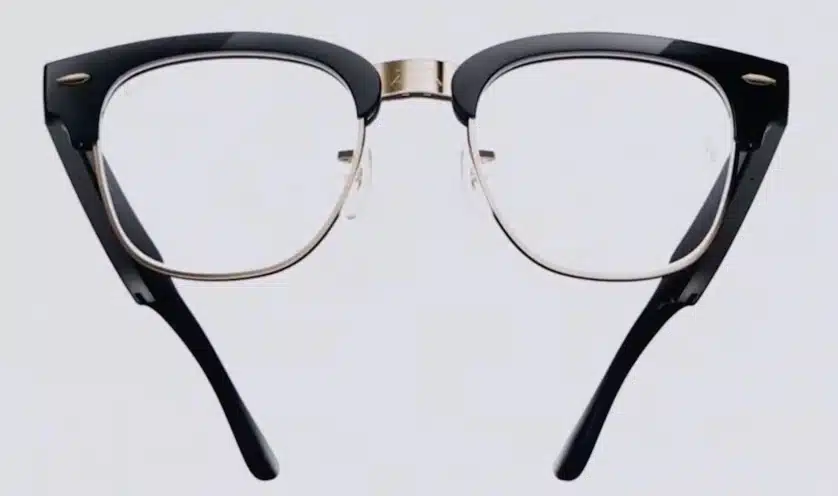
Ray-Ban Meta Audio is Meta’s first pair of Ray-Ban Meta glasses without a camera. Think of it as a pair of open-ear headphones built into a normal-looking Ray-Ban frame, with Meta AI (now powered by Meta’s Muse assistant) on board. You can play music and podcasts, take calls, get live translation, and ask the assistant questions by voice.
For a long time, people searched for “Ray-Ban Meta without camera” or “Meta glasses without camera” and came up empty. Meta says most owners use the audio features far more than the camera anyway, so this pair drops the camera and puts the saved space toward a slimmer frame and a bigger battery.
One naming note: Ray-Ban Meta Audio is a new product, not a setting on your existing glasses. If you landed here because the sound on your current Ray-Ban Meta pair isn’t working, my Ray-Ban Meta smart glasses features guide covers the audio controls on the camera models.
Ray-Ban Meta Audio Price and Release Date vs Gen 3 Price
Ray-Ban Meta Audio Price and Release Date
Ray-Ban Meta Audio starts at $349 in the US (£319 in the UK, AU$529 in Australia). Pre-orders opened at Connect on September 23, and the glasses ship on October 13. If you want smart glasses before then, for a trip or a gift, Gen 3 is the only one of the two you can buy today. As with every Ray-Ban Meta model, prescription lenses cost extra on top of the base price.
Ray-Ban Meta Gen 3 Price and Availability
Ray-Ban Meta Gen 3 starts at $449 and is on sale now from Meta and Amazon. That’s a price bump over Gen 2, which launched at $379. Special finishes cost more: the limited-edition Warm Beige Aviators run $549.
So the real price gap is $100 at the base level, and it grows once you add premium lenses or a limited colorway to Gen 3. That $100 buys you a camera and visual AI. It also costs you three hours of battery life.
What You Give Up With Ray-Ban Meta Audio (No Camera)
For most buyers, the camera decides it. Dropping it costs you more than photos.
No Photos or Video
Gen 3 has a 12MP camera that records 3K Ultra HD video, and it can capture 360-degree spatial sound with Dolby Atmos alongside the footage. In practice, that’s what makes camera glasses fun: filming your kid’s first bike ride without holding up a phone, or grabbing a quick point-of-view clip on a hike. Ray-Ban Meta Audio can’t do any of that.

No Visual AI
This is the bigger loss in my book. With Gen 3, you can look at a menu in another language, a plant, or a landmark and ask Meta AI about it. The assistant sees what you see. On Ray-Ban Meta Audio, the assistant is voice-only. It can still answer questions, set reminders, send messages, and handle your Muse tasks, but it has no idea what’s in front of you.
One thing you don’t give up: both pairs have the same customizable action button, which you can map to Meta AI or other shortcuts, so controls aren’t a reason to pick one over the other.
If neither photos nor visual AI would change how you use smart glasses, the Audio pair is the smarter buy.
Ray-Ban Meta Audio Battery Life vs Gen 3: 12 Hours vs 9 Hours
Ray-Ban Meta Audio is rated for up to 12 hours on a charge, plus up to 48 more hours from the charging case. Ray-Ban Meta Gen 3 is rated for up to 9 hours, one hour more than Gen 2.
Those three extra hours matter more than they look on paper. Nine hours covers a workday if you’re only dipping in and out of music and calls. But if you listen to podcasts on the commute, take a few calls, and then want music at the gym in the evening, a camera pair can run out before you do. Twelve hours means you can put the Audio glasses on in the morning and not think about the battery until you’re home.
Keep in mind these are best-case numbers. Streaming audio nonstop drains any smart glasses faster than light use, and on camera models, recording video eats battery quickly. With no camera on board, there’s simply less draining the Audio pair.
Ray-Ban Meta Audio Weight and Comfort vs Gen 3
At 43 grams, Ray-Ban Meta Audio is the lightest pair Meta sells. The lightest Gen 2 frame weighed 49 grams. Meta hasn’t published a weight for Gen 3 yet, but it says the frames are slimmer than before.
Six grams doesn’t sound like much, but glasses sit on your nose and ears all day, and every gram shows up by the afternoon. When I tried the Audio pair at the Connect demo, they felt closer to regular sunglasses than to a gadget. That’s the main reason I’d pick them for all-day wear.
The Audio model also borrows fit adjustments from Meta’s prescription line: adjustable temple tips, swappable nose pads, and overextension hinges that flex outward instead of pinching wider heads. Gen 3 doesn’t get the adjustable nose pads. If you’ve had Ray-Ban Meta glasses slide down your nose or press behind your ears, the Audio frame gives you more ways to fix that.
Audio Quality and Microphones: Which Sounds Better?
Speakers and Dolby Atmos
Both pairs use open-ear speakers that sit just above your ears, so you can still hear traffic and conversations around you. Meta is adding Dolby Atmos playback across its new glasses, which gives videos and music a wider, more surround-like sound when your glasses are connected to your phone.
Open-ear audio has the same limits on both pairs. Bass is lighter than in earbuds, and at high volume in a quiet room, the person next to you can hear some of what you’re playing. Neither pair replaces noise-canceling headphones on a plane.
Microphones and Call Quality
Both pairs use the same six-mic array, which Meta says cuts more than 90% of background noise. In real use, that means the person on the other end of a call hears your voice instead of the coffee shop, the wind, or the traffic around you. Call quality is a tie, so if calls are your main use, the Audio pair’s extra battery life makes it the better pick.
Meta AI and Muse: Which Features Work Without a Camera?
Most of Meta’s AI features are voice-based, so they work the same on both pairs:
- Asking questions, setting timers and reminders, and sending messages by voice
- Muse, Meta’s personal AI agent, including hands-free voice mode and tasks like shopping and scheduling
- Live translation of conversations
- Music, podcasts, and calls through your phone
- Personalized audio settings, including left/right balance and mono audio
The features that need a camera only work on Gen 3:
- “Look and ask” visual questions about what’s in front of you
- Photo and video capture, including dynamic burst photos
- Visual shopping features like identifying a product and checking its price
In other words, Ray-Ban Meta Audio keeps the voice half of Meta AI, which is the half most people use every day.
Are Camera-Free Smart Glasses Allowed Where Camera Glasses Are Banned?
This is a big reason Ray-Ban Meta Audio exists. Camera glasses have picked up a bad reputation, and more gyms, offices, bars, event venues, and courtrooms now ban them outright. Gen 3 has an LED that lights up while recording, but plenty of people don’t trust it or don’t notice it.
Camera-free smart glasses sidestep most of that. There’s no lens pointed at anyone, and no recording light to explain. In most places that ban camera glasses, a pair that can’t take photos should be treated like a pair of Bluetooth headphones.
Two caveats. First, the Audio glasses still have microphones, so a venue that bans all recording devices may not make an exception. Second, staff can’t tell your frame apart from a camera pair at a glance, so you may have to explain. Check the rules before you rely on them for work, school, or a locker room.
Styles and Prescription Lenses: Clubmaster and Burbank vs Wayfarer, Aviator and Zena
Ray-Ban Meta Audio Styles
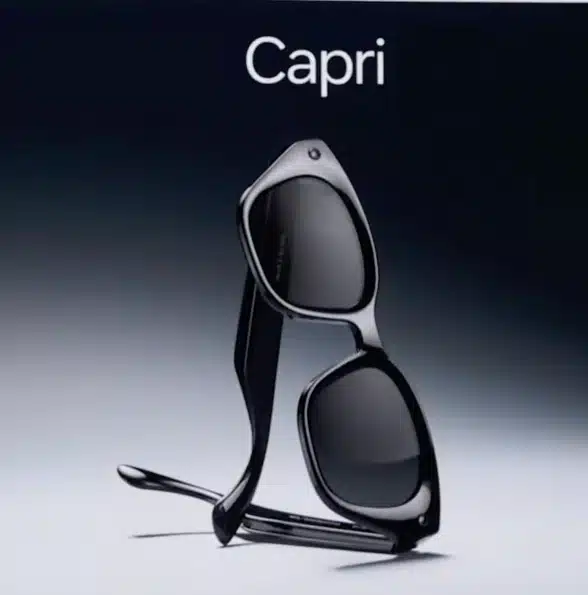
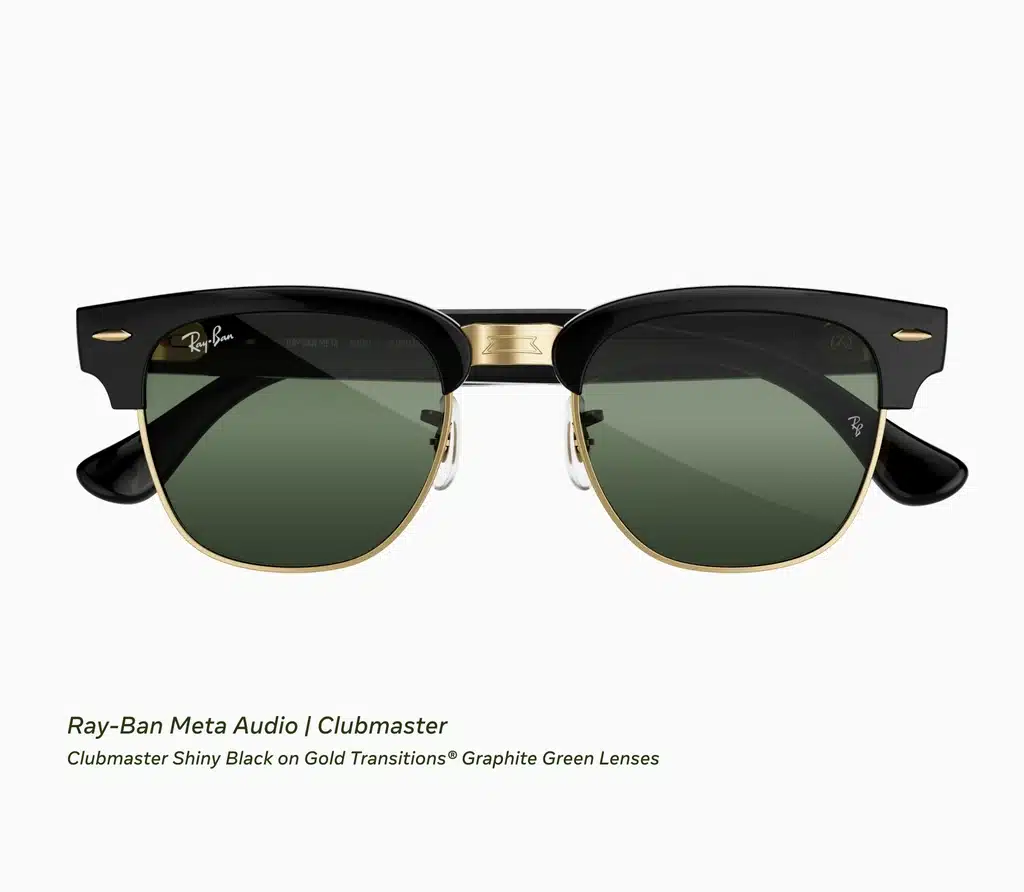
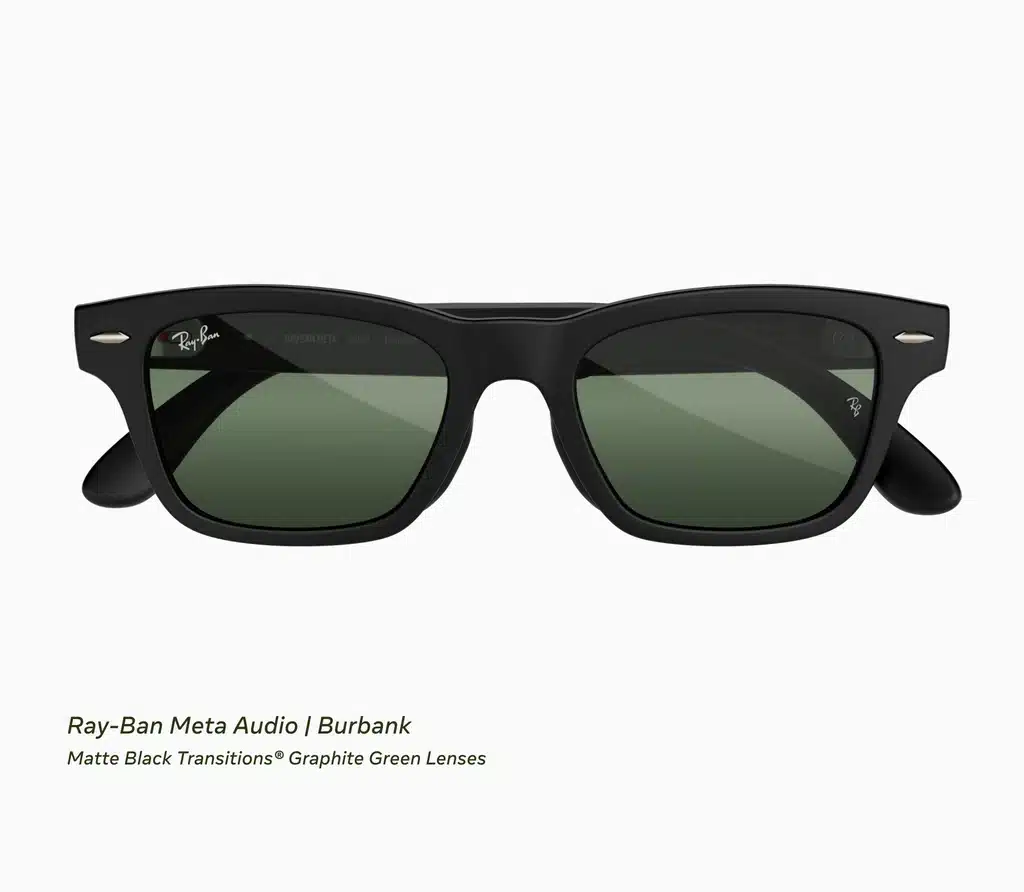
Ray-Ban Meta Audio comes in two frames. Clubmaster is the retro browline shape, and it’s the most distinctive style in Meta’s whole lineup. Burbank is a classic rectangle that looks close to a Wayfarer. Between them, Meta offers 23 color and lens combinations. If you want smart glasses that don’t look like tech, Burbank is the safer pick. Clubmaster is the one to choose if you want the frame itself to stand out.
Ray-Ban Meta Gen 3 Styles
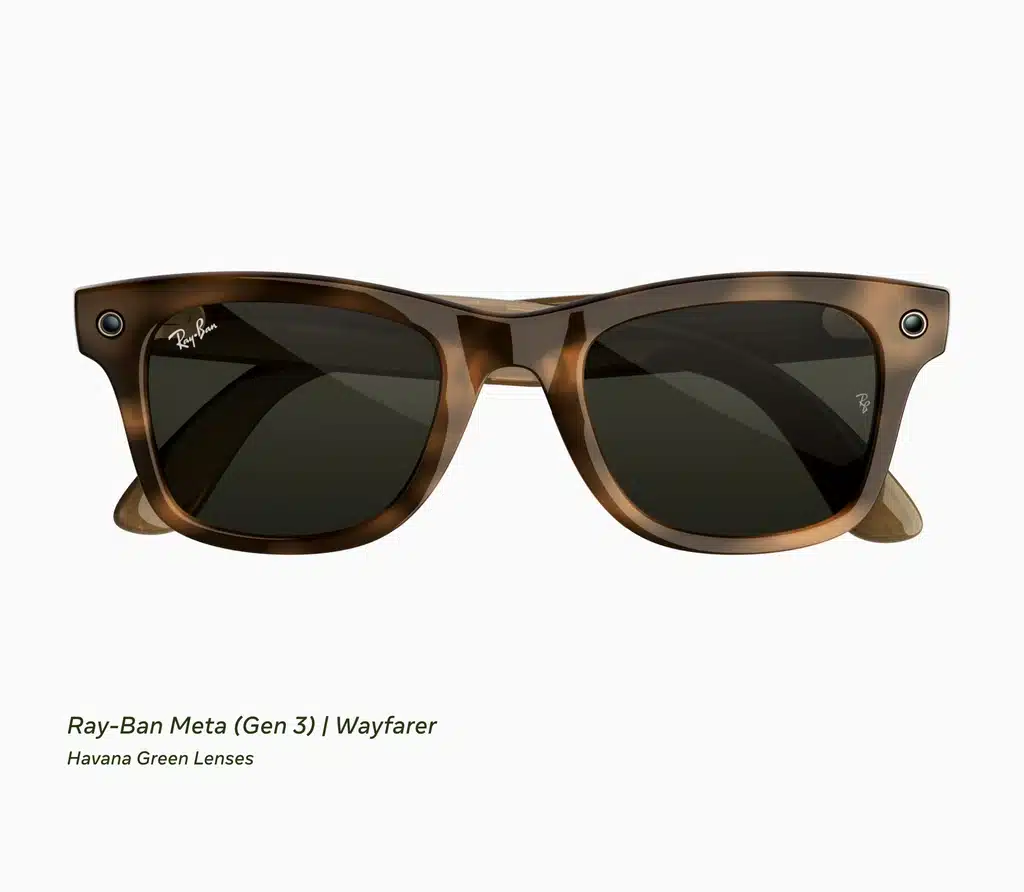
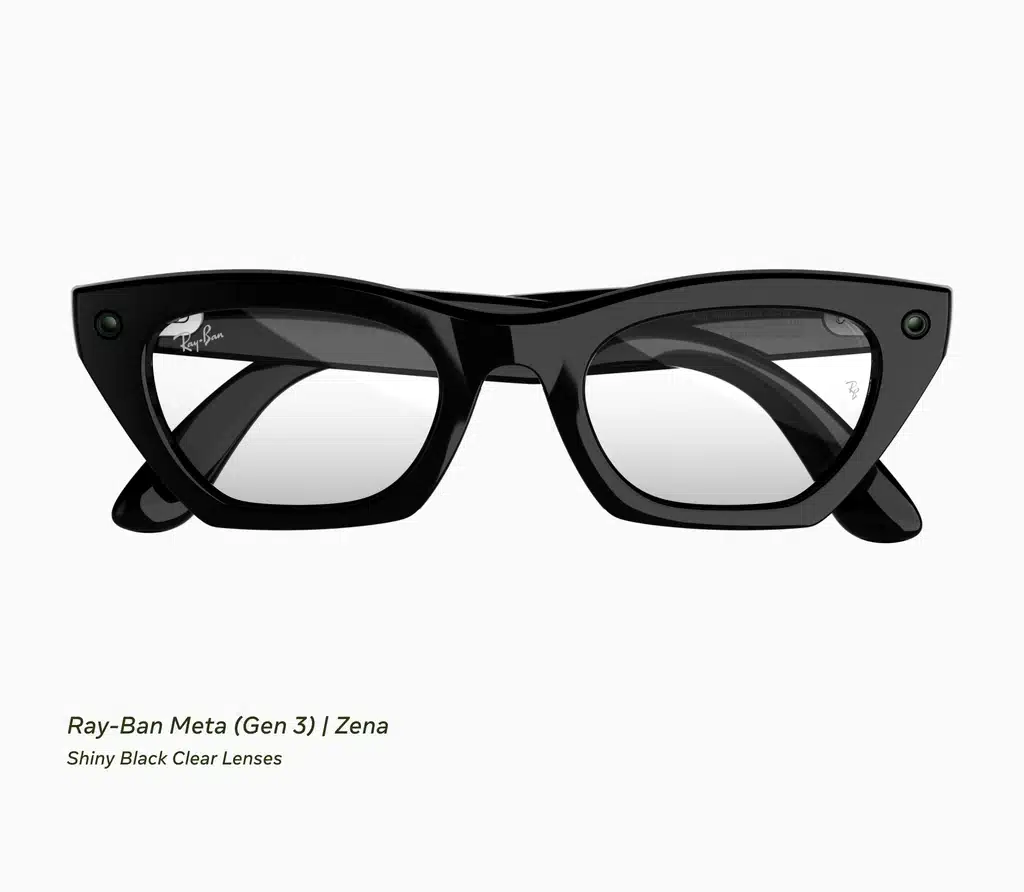
Gen 3 comes in the classic Wayfarer plus two new shapes: Aviator, a larger frame with wide lenses, and Zena, a narrower cat-eye style. All three come in black and Havana, with 27 color and lens combinations in total plus seasonal limited editions. The wider Aviator frame tends to suit larger faces, while Zena’s narrower shape is the better fit for smaller ones.
Prescription Lenses
Both pairs support prescription lenses. If you wear glasses full time, the Audio pair’s lighter weight and adjustable fit make it the easier pair to live in from morning to night.
Hearing Enhancement on Ray-Ban Meta Audio and Gen 3
Meta also announced Hearing Enhancement, an FDA-cleared, over-the-counter hearing feature for adults with mild to moderate hearing loss. It uses the glasses’ microphones to boost the voice of the person in front of you and plays it through the speakers.
It’s a paid add-on: a 30-day trial, then a one-time $149.99 fee (HSA/FSA eligible), or it’s included with a Meta One subscription. It launches in the US later in 2026 on Meta’s own-brand Meta Glasses first, then comes to Ray-Ban Meta Gen 3 and Ray-Ban Meta Audio after that. Meta hasn’t given a firm date for those two.
If hearing support is your main reason to buy, Nuance Audio (EssilorLuxottica’s hearing-aid glasses) is worth a look too. It’s built around hearing assistance first, while Ray-Ban Meta treats it as one feature among many.
What About Ray-Ban Meta Gen 2 and the $249 Meta Adventurer?
There are two cheaper ways into Meta’s smart glasses that are worth a look before you spend $349 or more.
Ray-Ban Meta Gen 3 vs Gen 2
Gen 2 is still sold, and retailers often discount the older model after a new one launches. Gen 3 gets you one more hour of battery (9 vs 8), a sixth microphone, the action button, and new frame styles. If you already own Gen 2, that’s not a must-upgrade list. If you’re buying your first pair and find Gen 2 on sale, it’s still a strong camera option. See my Ray-Ban Meta vs Stories comparison for how the older generations stack up.
Meta Glasses vs Ray-Ban Meta: The Meta Adventurer
Meta also sells AI glasses under its own “Meta Glasses” brand, separate from Ray-Ban. The new Meta Adventurer is the cheapest pair in the lineup at $249 (black frame, grey lenses), shipping October 23. If you want camera glasses and don’t care about the Ray-Ban name, it’s the lowest-cost way in.
And if you want a display in the lens instead of just audio, the Meta Ray-Ban Display now costs $799 in the US.
Should You Buy Ray-Ban Meta Audio or Gen 3?
Choose Ray-Ban Meta Audio If…
- You mostly want music, podcasts, calls, and a voice assistant
- You want the longest battery life and the lightest frame Meta makes
- You work or spend time in places that ban camera glasses
- You’re uncomfortable wearing a camera, or the people around you are
- You wear prescription glasses all day and fit is a priority
- You’d rather save $100
Choose Ray-Ban Meta Gen 3 If…
- You want hands-free photos and 3K video
- You want Meta AI to see and answer questions about what you’re looking at
- You like the Wayfarer, Aviator, or Zena frames more than Clubmaster or Burbank
Frequently Asked Questions
Does Ray-Ban Meta Audio have a camera?
No. Ray-Ban Meta Audio is Meta’s first pair of Ray-Ban Meta glasses with no camera. It can’t take photos or record video, and it has no recording LED.
Can Ray-Ban Meta Audio use Meta AI?
Yes. You can ask Meta AI questions, use Muse, send messages, get live translation, and control music by voice. The only AI features you lose are the ones that need a camera, like asking about what you’re looking at.
How long does the Ray-Ban Meta Audio battery last?
Up to 12 hours on a single charge, plus up to 48 more hours from the charging case. Ray-Ban Meta Gen 3 lasts up to 9 hours.
When does Ray-Ban Meta Audio come out?
Ray-Ban Meta Audio is available to pre-order now and ships on October 13, starting at $349 in the US.
Are there Meta glasses without a camera light?
Ray-Ban Meta Audio has no camera, so it has no recording light. Every Meta camera model, including Ray-Ban Meta Gen 3, has an LED that turns on while recording.
Can you get Ray-Ban Meta Audio with prescription lenses?
Yes. Both Ray-Ban Meta Audio and Ray-Ban Meta Gen 3 support prescription lenses, ordered through Ray-Ban or Meta when you buy.
Is Ray-Ban Meta Gen 3 worth it over Gen 2?
Only if you want the extra hour of battery, the sixth microphone, the action button, or the new Aviator and Zena styles. If you already own Gen 2, there’s no urgent reason to upgrade.
Final Verdict: Ray-Ban Meta Audio vs Gen 3
For most people, Ray-Ban Meta Audio is the better everyday pair. It’s $100 cheaper, lasts three hours longer, weighs less, fits better, and you can wear it into places where camera glasses get side-eyed or banned. You still get Meta AI, Muse, calls, music, and translation.
Ray-Ban Meta Gen 3 is the right pick if the camera is the point. Hands-free photos and video, and an assistant that can see what you see, are things the Audio pair can’t do at any price. If that’s what drew you to smart glasses in the first place, spend the extra $100.
Whichever pair you choose, check out my best Ray-Ban Meta accessories guide for cases, chargers, and lens add-ons.