

In this comparison guide, I’ll break down the Steam Machine vs Steam Deck vs Steam Frame decision using the real, current specs and pricing for all three devices, not pre-launch estimates. Now that the Steam Frame has been released, we have the latest information! Most existing “which Valve device” guides online are still working from guesses for the Frame while treating the Deck and Machine as settled.
Related: Read our full Steam Frame review for a deeper look at Valve’s new VR headset, or check out our full guide to the best VR headsets if you’re still shopping around.
Steam Machine vs Steam Deck vs Steam Frame: The Quick Answer
Short answer: pick the Steam Deck OLED ($789+) if you want to game anywhere without building a TV setup, the Steam Machine ($1,049+) if you want Steam on a TV and don’t already own a gaming PC, and the Steam Frame ($1,059+) if you want VR that can run standalone or stream wirelessly from a PC. None of these devices replaces either of the other two. Buy based on the room you’ll actually be sitting in, not the price tag.
Steam Machine vs Steam Deck vs Steam Frame: Full Specs and Price Comparison Table
Here’s how all three stack up side by side, using confirmed specs and pricing pulled from Valve’s own product pages rather than pre-launch estimates.
|
Spec |
Steam Deck OLED |
Steam Machine |
Steam Frame |
|---|---|---|---|
|
Category |
Handheld gaming PC |
Living-room console PC |
|
|
Chip |
Custom AMD Zen 2, 4-core/8-thread |
Semi-custom AMD Zen 4, 6-core/12-thread |
Qualcomm Snapdragon 8 Gen 3 (ARM64) |
|
GPU |
RDNA 2, 8 compute units (~1.6 TFLOPS) |
RDNA 3, 28 compute units, up to 2.45GHz, 110W TDP |
Mobile SoC GPU tuned for streaming and foveated rendering |
|
Memory |
16GB LPDDR5 unified |
16GB DDR5 system RAM + 8GB dedicated GDDR6 VRAM |
16GB LPDDR5X unified |
|
Storage |
512GB or 1TB NVMe + microSD |
512GB or 2TB NVMe + microSD |
256GB or 1TB UFS + microSD |
|
Display |
7.4″ OLED, 1280×800, 90Hz |
External via DisplayPort 1.4 or HDMI 2.0 |
Dual 2,160×2,160 LCD, up to 144Hz |
|
Battery |
50Wh (roughly 3–12 hours by game) |
Mains-powered, internal PSU |
21.6Wh (roughly 1–1.5 hours real-world) |
|
Weight |
~640g |
~2.6kg |
440g total (185g core visor) |
|
Starting price |
$789 (512GB) |
$1,049 (512GB) |
$1,059 (256GB) |
|
Release status |
Released Nov 2023, widely available |
Launched June 2026, reservation-only |
Launched Sept 2026, reservation-only |
Steam Deck OLED Price and Specs: Still the Best Way to Play Steam Anywhere
If portability is anywhere on your list of requirements, the Steam Deck OLED is still the easy default in this three-way comparison. It’s the most mature of Valve’s three devices by a wide margin: years of per-game performance tuning, the deepest community documentation (ProtonDB, SteamDeckHQ) of any handheld on the market, and a controller layout that works straight out of the box with no setup.
- CPU: Custom AMD Zen 2, 4-core/8-thread, 2.4–3.5GHz
- GPU: RDNA 2, 8 compute units, roughly 1.6 TFLOPS
- RAM: 16GB LPDDR5 unified memory, shared between CPU and GPU
- Storage: 512GB or 1TB NVMe SSD, plus a microSD expansion slot
- Display: 7.4-inch OLED, 1280×800, 90Hz, up to 1,000 nits HDR peak
- Battery: 50Wh, roughly 3 to 12 hours depending on the game
- Weight: approximately 640g
- Price: $789 (512GB) or $949 (1TB)

One thing worth flagging if you last checked Steam Deck OLED pricing a while ago: Valve raised prices by up to $300 across the lineup in May 2026, citing rising component costs and global logistical pressures. The 512GB model that used to sell for $549 is now $789, and the 1TB model moved from $649 to $949. That price increase is exactly why the gap between the Deck and the Machine has narrowed since last year, and it’s worth knowing going in so the Machine’s premium doesn’t look bigger than it actually is.
Steam Machine Price, Specs, and Release Date: Valve’s Living Room PC, Not a 4K Console
The Steam Machine is the right pick if your goal is genuinely simple: Steam on your TV, with mods and Steam sale pricing, and you don’t already own a gaming PC. It launched in June 2026 as Valve’s return to an idea it tried and shelved a decade ago, a small-form-factor console-style PC that plugs straight into a TV and runs SteamOS instead of a locked-down console operating system.
- CPU: Semi-custom AMD Zen 4, 6-core/12-thread
- GPU: Semi-custom RDNA 3, 28 compute units, up to 2.45GHz, 110W TDP
- Memory: 16GB DDR5 system RAM plus 8GB dedicated GDDR6 VRAM
- Storage: 512GB or 2TB NVMe SSD, plus a microSD expansion slot
- Video outputs: DisplayPort 1.4 and HDMI 2.0
- Networking: Wi-Fi 6E, Bluetooth 5.3, Gigabit Ethernet
- Weight: approximately 2.6kg
- Price: $1,049 (512GB, no controller) or $1,128 with the redesigned Steam Controller; $1,349 (2TB, no controller) or $1,428 with the Steam Controller, which also adds two extra faceplates (red fabric and solid walnut)
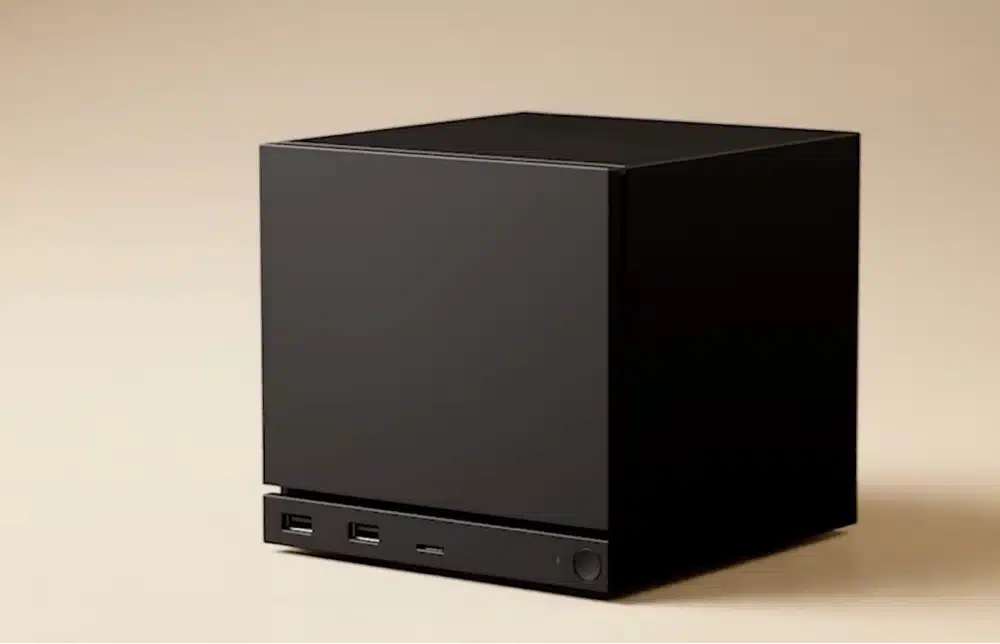
Like the Steam Frame, the Steam Machine isn’t sitting on retail shelves. Valve sells it exclusively through a reservation system on its own website, the same model it’s using for the headset. Deck-Verified game compatibility carries over to the Machine too: since the Machine is roughly six times the Deck’s raw GPU power, virtually anything that already runs well on a Deck runs comfortably here.
That “six times more powerful” figure gets thrown around a lot, and it’s technically accurate, but it doesn’t mean what a lot of marketing-adjacent coverage implies. We break down exactly what it does and doesn’t translate to in the performance section below.
Steam Frame Price, Release Date, and Battery Life: VR That Works Standalone or Streamed From Your PC
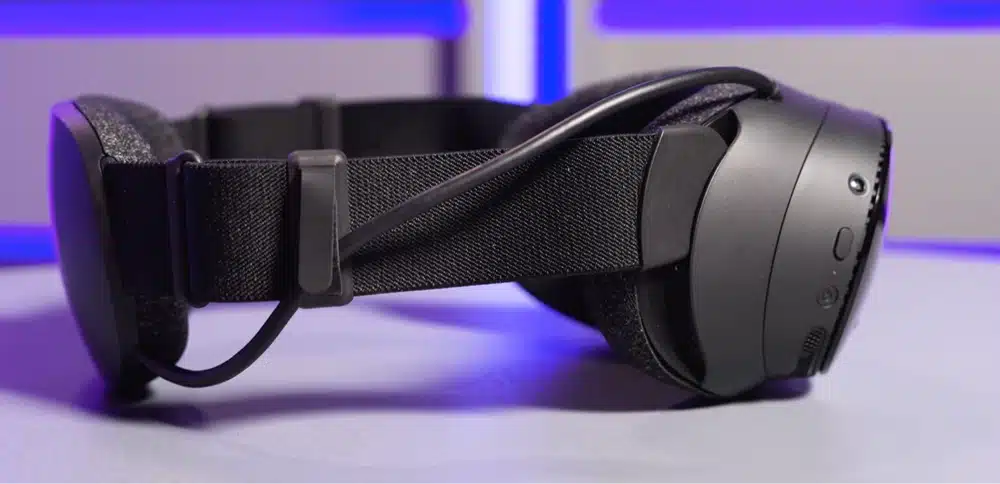
The Steam Frame is Valve’s first standalone VR headset, and the newest of the three by more than two months. It runs SteamOS on its own onboard Snapdragon chip rather than needing a PC tethered at all times like the 2019 Valve Index did, but its real identity is as a wireless streaming device for an existing gaming PC: it ships with a dedicated Wi-Fi 6E dongle and a feature called Multi-Link Streaming that intelligently blends that dedicated connection with your home Wi-Fi to keep things stable.
That separation matters in a house with a lot of other Wi-Fi traffic, a family streaming video, a mesh network, several smart-home devices, since the video feed powering your VR session isn’t competing with all of that for the same bandwidth.
- Chip: Qualcomm Snapdragon 8 Gen 3, 4nm, ARM64
- RAM: 16GB LPDDR5X unified
- Storage: 256GB or 1TB UFS, plus a microSD expansion slot
- Display: dual 2,160×2,160 LCD panels with pancake lenses, up to 144Hz in an experimental mode, roughly 103–110 degrees field of view
- Battery: 21.6Wh, USB-C charging at 45W
- Weight: 185g for the core visor, 440g total with the head strap and rear-mounted battery
- Price: $1,059 (256GB Kit) or $1,299 (1TB Kit), both including the Steam Frame Controllers, the Wi-Fi 6E streaming dongle, and a copy of Half-Life: Alyx
Two honest caveats worth knowing before you get excited about the spec sheet. First, real-world battery life lands around 1 to 1.5 hours of mixed use, dropping closer to 90 minutes in demanding titles, noticeably shorter than the Meta Quest 3’s roughly 2 hours.
Second, the base package doesn’t include a top strap, which means out of the box, all the weight rests on your forehead; Valve sells a $59 to $60 Ergonomic Accessories Kit to fix that, and most buyers will want to budget for it as part of the real purchase price.
Passthrough is another rough edge: it’s low-resolution and greyscale by default, a clear step behind the Quest 3’s full-color passthrough, and glasses wearers may need to swap in the included roomier face cushion to avoid nose-bridge pressure. We cover all of this in far more depth in our full Steam Frame review.
As for actually getting one: the Steam Frame launched through the same reservation system as the Steam Machine rather than open retail availability. Signups closed September 17, 2026, with the first purchase invitation emails going out September 18. If you missed that window, Valve’s own Steam Frame hardware page is the place to watch for the next one, not a retail shelf.
Steam Machine vs Steam Deck vs Steam Frame: Performance, Explained
The headline number in most Steam Machine coverage is that it’s roughly six times more powerful than the Steam Deck. That figure comes from comparing the two GPUs directly, and it’s a real, defensible number: the Machine’s 28-compute-unit RDNA 3 GPU genuinely outclasses the Deck’s 8-compute-unit RDNA 2 chip by that kind of margin on raw throughput. What it doesn’t mean is that the Steam Machine is a native 4K machine in every game you throw at it.
The realistic ceiling is 1080p native, or 1440p with AMD’s FSR upscaling, at medium-to-high settings in demanding 2025–2026 titles. The hard limit is the Machine’s 8GB of dedicated VRAM: modern games at high texture settings with ray tracing enabled will hit that wall before the GPU core itself runs out of steam, especially in newer, more demanding releases.
Treat any “native 4K 60fps” framing you see elsewhere as a claim worth testing per game, not a settled fact. For older, lighter, or well-optimized titles, higher resolutions are genuinely fine. For a graphically demanding, ray-traced title running everything maxed out at 4K ultra, they generally aren’t.
The Steam Frame sits outside this comparison entirely since it’s solving a different problem: its mobile Snapdragon chip isn’t designed to compete with either PC on raw horsepower, and its real performance story is about how well it streams a game running on your actual gaming PC rather than how well it renders one locally. Judged as a standalone device, it’s the weakest of the three on paper. Judged as a wireless extension of a PC you already own, that comparison doesn’t really apply.
Which Valve Device Should You Buy? Choose By Where You’ll Play
Most of the confusion around this decision comes from treating these three devices as a ladder from cheap to premium. They aren’t. They’re answers to where you’ll actually be sitting when you play.
Choose the Steam Deck OLED If…
- Portability matters at all, whether that’s the couch, a flight, or a commute
- You want the most proven, best-documented device of the three
- You’d rather spend $789 than $1,049 and don’t need a TV setup
- You’re also interested in emulation and want the deepest community tooling available
Choose the Steam Machine If…
- You want Steam on a TV and don’t already own a gaming PC
- You care about mods, Steam sale pricing, and Proton compatibility more than a locked-down console ecosystem
- You’re comfortable with 1080p to 1440p performance rather than chasing native 4K
- You’re willing to go through Valve’s reservation system rather than buying off a shelf
Choose the Steam Frame If…
- You already own a capable gaming PC with a real Steam library you want to play wirelessly
- Wireless PC VR streaming is genuinely the reason you want a headset, not an afterthought
- You’re comfortable budgeting extra for the Ergonomic Accessories Kit most buyers end up wanting
- Mixed reality and long, all-day battery life aren’t priorities for you
Is the Steam Frame Worth It Over the Meta Quest 3?
If VR is the piece of this comparison you’re actually weighing, the Steam Frame’s real competition isn’t the Steam Deck or the Steam Machine, it’s the Meta Quest 3. The short version: the Quest 3 starts around $499, roughly $560 less than the cheapest Steam Frame kit, and wins on price, mixed-reality passthrough, and battery life.
The Steam Frame counters with more RAM, expandable storage, and by far the stronger PC-streaming setup thanks to its dedicated 6GHz dongle. That extra RAM headroom matters most while streaming, since decoding a high-bitrate wireless video feed and running the headset’s own tracking pipeline at the same time is exactly the kind of multitasking a larger memory pool helps with, and the expandable storage means you’re not forced to uninstall a large native title just to make room for something new, unlike the Quest 3’s fixed capacity.
Neither headset is a strict upgrade over the other, they’re built around different priorities.
We go much deeper on this exact matchup, spec by spec, in our full Steam Frame vs Meta Quest 3 comparison guide.
Frequently Asked Questions
Is the Steam Machine Worth It?
If you want Steam on a TV and don’t already own a gaming PC, yes. At $1,049 and up, it’s roughly six times more powerful than a Steam Deck and gives you the full open Steam library, mods, and sale pricing rather than a locked-down console ecosystem. A PS5 still beats it on price-per-frame, but no console lets you play your existing Steam library natively.
Is the Steam Frame Worth It?
Only if PC streaming is the actual reason you want a VR headset. As a standalone device, the Steam Frame loses to the Meta Quest 3 on price, battery life, and passthrough quality. As a wireless extension of an existing gaming PC’s Steam library, it does something the Quest 3 can’t match nearly as well.
How Long Does the Steam Frame’s Battery Last?
Real-world battery life lands around 1 to 1.5 hours of mixed standalone and streaming use, dropping closer to 90 minutes during demanding titles. That’s noticeably shorter than the Meta Quest 3’s roughly 2 hours of general use, and worth planning around if you’re expecting long sessions.
Do I Need a Gaming PC for the Steam Frame?
No, but you’ll get much more out of it if you have one. The Steam Frame runs SteamOS on its own hardware and can play a certified library of roughly 75 “Great on Frame” titles standalone. Its strongest feature by far, though, is wireless streaming from a gaming PC over its dedicated 6GHz dongle, which is where most of its Steam library actually becomes playable.
Can the Steam Machine Really Do Native 4K Gaming?
Not consistently in demanding titles. The Machine’s 8GB of dedicated VRAM becomes a real ceiling at high texture settings with ray tracing enabled. The realistic target is 1080p native or 1440p with FSR upscaling at medium-to-high settings; native 4K works fine in older or lighter games, but treat “4K 60fps” marketing claims as something to test per game, not a guarantee.
How Much Storage Do I Need: Steam Deck, Steam Machine, or Steam Frame?
All three offer a smaller and larger tier plus microSD expansion, so you’re rarely stuck. The Steam Deck comes in 512GB or 1TB, the Steam Machine in 512GB or 2TB, and the Steam Frame in 256GB or 1TB. If your Steam library is large or you install big modern titles regularly, size up; microSD expansion on all three means a smaller tier isn’t a permanent limit either way.
Is the Steam Machine Better Than a PS5?
Not dramatically, on raw specs. A PS5’s unified GDDR6 memory pool and GPU throughput are comparable to, and by some measures ahead of, the Steam Machine’s, and a PS5 costs less. The Machine’s premium mostly buys the open Steam platform, mods, Steam sale pricing, Proton compatibility, and desktop mode, none of which a PS5 offers, rather than a clear performance win over a cheaper console.
What Controllers Come With the Steam Frame?
Both Steam Frame kits include the Steam Frame Controllers, a traditional gamepad-style pair with a D-pad, four face buttons, analog sticks, triggers, and grip buttons, a deliberate departure from the finger-tracking “knuckle” design of the older Valve Index controllers. That layout is built to work naturally with any game designed for a standard gamepad, not just VR-native titles.
Final Thoughts
The cleanest way to settle the Steam Machine vs Steam Deck vs Steam Frame decision is to stop comparing spec sheets and start thinking about the room you’ll actually be in. The Steam Deck OLED remains the most proven, most portable, and cheapest way into Valve’s ecosystem.
The Steam Machine is a genuinely capable living-room PC for anyone who wants Steam on a TV without building or buying a full desktop, as long as you go in with realistic expectations about what “six times more powerful” actually gets you. The Steam Frame is the newest and most specialized of the three: a real advance in wireless PC VR streaming wrapped around a headset that still has rough edges in comfort, battery life, and passthrough quality at launch.
None of these three devices makes the other two obsolete, and Valve doesn’t seem to be building them that way. Pick the one that matches where you actually sit down to play, not the one with the highest number on its spec sheet.