
The Modern Warfare 2 VR mod turns the Call of Duty: Modern Warfare 2 Campaign Remastered single-player campaign into a full motion-controlled VR game, and in this guide I’ll show you how to install it and play it on a Meta Quest, Steam Frame, Index or PSVR2. It’s free, it’s open source, and it installs by dropping a folder of files next to your game.
Modern Warfare 2 was never built for a headset, which is what makes this so strange the first time you try it. You grab your rifle with one hand, pull the magazine with the other, and throw frag grenades with your actual arm. This guide covers the Overlord mod by Aeka0, Beta 5 (released October 10), which is the current version as I write this. It’s still a beta from a single developer, so I’ll point out what works, what’s still rough, and what’s untested.
Modern Warfare 2 VR Mod at a Glance
| Detail | Answer |
|---|---|
| Creator | Aeka0 (the project is called Overlord) |
| Price | Free (you need your own copy of the game) |
| Game it works with | Call of Duty: Modern Warfare 2 Campaign Remastered (2020), Battle.net copy |
| What it covers | The single-player campaign only |
| Version covered | Beta 5 (v0.5.0-beta), released October 10 |
| Download | Overlord.Beta.5.7z on GitHub (about 36.6 MB) |
| VR runtime | OpenXR by default, OpenVR as a manual backup, both through SteamVR |
| Controllers | Meta Quest controllers validated (mainly Quest 3), Valve Index controllers tested in OpenVR |
| Operating system | Windows 10 or 11, 64-bit |
| Multiplayer | No |
| License | GPL-3.0 open source |
What Is the Modern Warfare 2 VR Mod?
The Modern Warfare 2 VR mod is a project called Overlord. According to its GitHub page, it adds stereoscopic rendering, head and hand tracking, and physical weapon handling to the 2020 Modern Warfare 2 campaign remaster. In practice that means you hold and aim your weapon with your hands, reload by hand, and holster guns on your body instead of pressing a button.
It’s the work of one developer, it’s released under the GPL-3.0 license, and the developer is upfront that it is a beta with no stable release yet. Updates may change how things feel, and the project page warns they can break saves, so I wouldn’t treat any one build as final.
Modern Warfare 2 Campaign VR: Remastered 2020 vs the 2009 Original
There are three different games people call Modern Warfare 2: the 2009 original, the 2020 Campaign Remastered, and the 2022 Modern Warfare II. The Overlord mod is for the 2020 Campaign Remastered only. It does not work with the 2009 original or the 2022 game.
Overlord GitHub: Which Repo Is the Real One?
The official project is Aeka0/Overlord. You’ll also find a fork with a nearly identical description. Download only from the Aeka0/Overlord Releases page so you get the build the developer actually ships.
Does Call of Duty Have VR? Can You Play Call of Duty on VR?
Not officially. There is no Call of Duty VR game on PC or Meta Quest, and Activision hasn’t confirmed an official VR mode for any Modern Warfare 2.
What does exist are fan mods, and the Modern Warfare 2 VR mod is the most complete Call of Duty campaign conversion I’ve seen so far. If you like this kind of project, the Titanfall 2 VR mod works the same way for another shooter, and I cover more of them in my best VR mods roundup.
Modern Warfare 2 VR Mod Requirements
These come from the Overlord GitHub page:
- Windows 10 or 11, 64-bit
- A legally owned, installed copy of Call of Duty: Modern Warfare 2 Campaign Remastered. Pirated or cracked copies aren’t supported
- SteamVR installed, and a headset with head and hand tracking that SteamVR can see
- A graphics card that supports Direct3D 11 (the mod uses it)
- Meta Quest controllers if you want the best-tested setup. Index, Oculus Touch and Vive bindings are included, but other combinations may need adjusting
Where to Buy Modern Warfare 2 Campaign Remastered
The 2020 remaster is sold on Battle.net. Prices change and key sites vary, so check the Battle.net listing for the current price. If you only want to play it in VR, the campaign is the only thing you need, because the mod doesn’t touch multiplayer.
Modern Warfare 2 Remastered Size and PC Specs for VR
The developer doesn’t publish minimum specs.
The game is a 2020 title and runs fine on a modest PC on a monitor, but VR renders it twice at much higher resolution. One reviewer maxed everything on an RTX 5090 at heavy supersampling on a Pimax Dream Air and saw roughly 31 to 35 FPS, which is a stress test and not what most people will run. You can get 50 FPS on a GTX 1080 with a limited streaming bit rate, so there is a lot of room to tune.
If you’re not sure your PC can handle VR at all, run through whether your PC is VR ready first, and see my guide to the best GPU for VR if you’re upgrading.
Modern Warfare 2 VR Mod Download: Which Overlord Release to Get
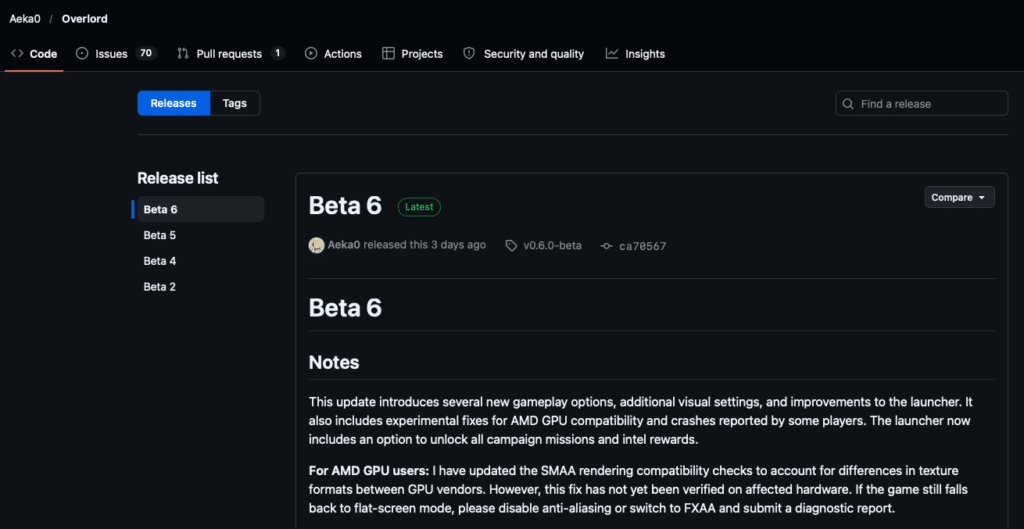
Go to the Overlord Releases page and download the newest release.
How to Install the Modern Warfare 2 VR Mod (Step by Step)
The install is quick, but the order matters. Don’t skip the flat-screen step in the middle.
Step 1: Find the Game Folder in Battle.net
Install Modern Warfare 2 Campaign Remastered in the Battle.net app first and let it finish downloading. Then click the gear icon next to the Play button and choose Show in Explorer. That opens the game’s root folder, which is where the mod files go.
Step 2: Extract Overlord.Beta.5.7z Into the Game Root
Extract the archive so its files sit directly in the game’s root folder, not in a new subfolder. If your extractor suggests a folder named after the archive, remove that last part of the destination path before you extract.
When it’s right, you should see overlord.exe, openxr_loader.dll and overlord.vrmanifest, plus the steamvr, vr_input and h2-mod folders, next to the game files.
Step 3: Launch the Game on Flat Screen First
Start the game normally from Battle.net, begin a new game, and play through the opening shooting range until the targets are down. That lets the game load and compile everything once. Then close it.
Step 4: Run overlord.exe and Click Run Anyway
Start SteamVR and put your headset on, or connect it through Virtual Desktop first (more on that below). Then double-click overlord.exe in the game folder.
Windows will probably warn you, because the program isn’t signed by a known publisher.
Click More info, then Run anyway. The project is open source, which is why you can read exactly what it does on GitHub if that worries you.
Step 5: Complete the First-Time Setup
The first launch walks you through the basics: language, controller alignment and turning style. I’d set these before touching anything else:
- Choose smooth or snap turning (snap is easier on your stomach)
- Run the controller alignment so the virtual hands line up with yours
- Leave artificial head smoothing off unless you find the view jittery
- Look at the assist options, which include quick reload, chambering guides and aim assist. The chambering guides show you how to reload each weapon, which helped me the first time
- Consider turning off any single-hand penalty, so one-handed shots from the hip still land where you point
When setup is done, click Singleplayer in the launcher with SteamVR running. The game opens in your headset.
Modern Warfare 2 VR on Meta Quest 3: Virtual Desktop or Steam Link
The mod runs on your PC, so a Quest has to stream the game from it. The developer’s validated controller setup is Quest controllers through SteamVR and OpenXR, and development has focused on the Quest 3.
Modern Warfare 2 VR With Virtual Desktop
Set up Virtual Desktop on your Meta Quest, launch SteamVR from inside it, then run overlord.exe on the PC. Run the game windowed rather than minimized, because streaming can drop frames if the desktop is hidden.
Modern Warfare 2 VR With Steam Link and SteamVR
Steam Link on Meta Quest presents your headset to SteamVR, so it should work the same way.
Modern Warfare 2 VR on Steam Frame, Valve Index, Pimax and PSVR2
The Overlord page lists what the developer actually tested. Valve Index controllers were tried in OpenVR, and one creator played on a Pimax Dream Air.
- Valve Index: bindings are included. On the default OpenVR Knuckles setup, click the left thumbstick to sprint and the right to jump, and squeeze the grip to hold a weapon
- Pimax: works through SteamVR, and the Dream Air showed up in a creator’s test. Start with OpenVR if OpenXR gives you trouble
- PSVR2 on PC: a community post says it works, with the launcher offering OpenXR or OpenVR. The developer hasn’t listed it, so it’s unconfirmed
- Steam Frame: not tested by the developer, as far as the project page says. Because it runs SteamVR, there’s a decent chance it works, and I’ll update this once someone confirms. My Steam Frame review covers the hardware
You can switch the VR backend in the launcher under VR Settings, then Basics. If your headset isn’t tracking properly under the default, flipping between OpenXR and OpenVR is the first thing to try.
Modern Warfare 2 VR Controls: Reloading, Grenades and Weapons
The controls are the best part of this mod. They follow what the project page lists, and they feel natural within a few minutes:
- Move and turn: the left stick moves, the right stick turns (smooth or snap, your choice)
- Hold a weapon: hold Grip near a grip point on the gun. Squeeze Trigger with that hand to fire
- Holster: move the weapon to a holster on your body and release Grip
- Reload and handle parts: use Trigger with your free hand. Magazines, slides and charging handles work differently on each gun
- Grenades: pick them up and throw them with your hand. Beta 4 even added the ability to throw a grenade back
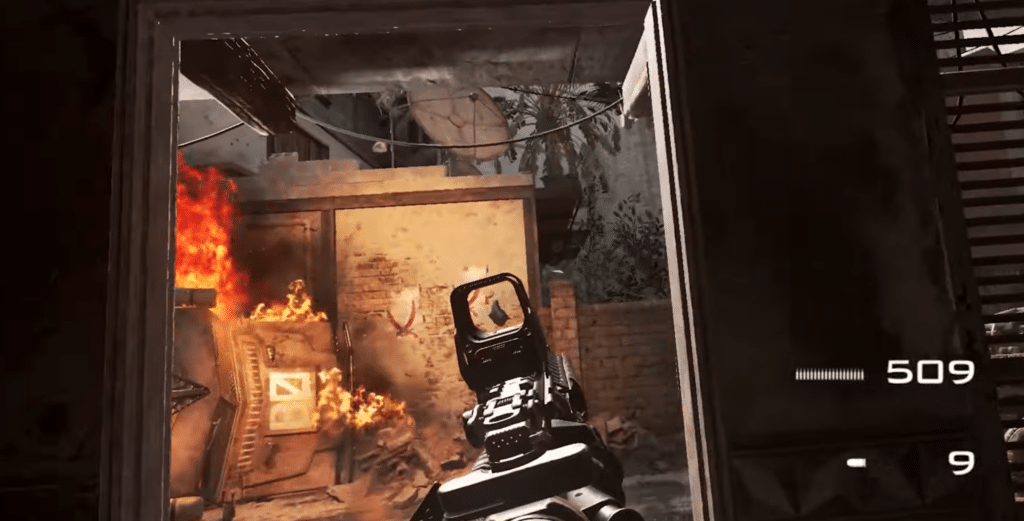
The opening shooting range is the perfect place to practice. Grab the rifle, drop an empty magazine, slap a fresh one in, and chamber a round, then switch to your sidearm and do it again. The first few reloads felt clumsy for me, but by the second range target I was doing them without thinking. Some people complain about dropping their weapon by accident, and I did it a few times too, mostly when I let go of Grip while turning.
Best Modern Warfare 2 VR Settings for Performance
Everything you see on your monitor is irrelevant, because the VR view is what counts. So the first trick is to lower the game’s graphics settings for the monitor, because the headset image is rendered separately.
- Open the game’s graphics settings, then Advanced, and lower the maximum frame rate and render resolution. Lowering texture and map resolution also helps if you’re running out of video memory
- If you hit a Create2DTexture error, turn off Shader Preloading in the game’s graphics settings. The Overlord page lists this as a fix
- Close MSI Afterburner before launching. The project page says it can stop Overlord from starting
- If you have an AMD graphics card, turn off anti-aliasing or switch to FXAA. The Beta 5 notes say this reduces cases where the game falls back to flat screen
- Start with the streaming bitrate and supersampling at moderate values and raise them only while your frame rate holds
For a broader checklist, see my guide on how to improve PC VR performance.
Modern Warfare 2 VR Motion Sickness: Comfort Tips
A Call of Duty campaign throws explosions, vehicles, snowmobile rides and cliff climbs at you, so it’s not the gentlest VR game. These are the things that helped me:
- Use snap turning until your VR legs adjust, then try smooth turning
- Keep artificial head smoothing off unless the picture feels jittery
- Take a break after the first couple of missions. The vehicle sections hit hardest
- Play standing or seated in a swivel chair, but pick one and stick with it for the session
- Don’t push resolution so far that your frame rate drops, because low frame rates make motion sickness worse
Cutscenes are shown in 2D, which is a nice breather. If you’re new to VR in general, my guide to VR motion sickness has more ways to build up your tolerance.
Modern Warfare 2 VR Multiplayer: Does It Work?
No. The Modern Warfare 2 VR mod covers the single-player campaign only. There’s no multiplayer, Spec Ops or online mode in Overlord, and the project page says non-VR custom mods aren’t expected to work.
Contractors VR Modern Warfare 2 Mod: Is It the Same Thing?
No, and it’s easy to confuse them. There’s a separate fan mod for the game Contractors VR that recreates the original Modern Warfare 2 multiplayer experience using assets from the campaign remaster.
That’s a loadout mod inside another VR game, not a way to play the Modern Warfare 2 campaign. If you want that one, you’ll find it on mod.io under Contractors VR.
Modern Warfare 2 VR Mod Not Working? Fixes for Common Problems
The Game Starts on the Flat Screen Instead of VR
Make sure SteamVR is running and your headset is connected before you launch overlord.exe. If that doesn’t help, switch the VR backend between OpenXR and OpenVR in the launcher. AMD graphics card users should also turn off anti-aliasing or use FXAA, as noted above.
Create2DTexture Error
Turn off Shader Preloading in the game’s graphics settings. The project page lists this as the fix.
Overlord Won’t Launch With MSI Afterburner Running
Exit MSI Afterburner completely, then start overlord.exe again.
Windows Blocks overlord.exe
Windows shows a warning because the file isn’t signed by a known publisher. Choose More info, then Run anyway. If your antivirus quarantines it, you can check the source code on GitHub before restoring it.
Hands Are Offset or Drift After Updating
New updates can change how controller tracking works, so you may need to realign your controllers. Quest 3 players can try the new zero-offset preset. Controller offsets and arm drift can always occur, so report it if it persists.
How to Report a Bug With vr_diagnose
Beta 5 added a vr_diagnose command. When something goes wrong, run it and attach the report to your GitHub issue. If the game crashes, attach the minidump instead. That’s the fastest way to get an actual fix from a single developer.
Known issues the developer lists include a black screen on the M82 and Javelin thermal view, reversed controls on the Predator drone, and a Pico black screen fix that’s awaiting confirmation.
Is the Modern Warfare 2 VR Mod Worth Playing?
Yes, if you can live with beta rough edges. The creators who’ve tried it describe it as feeling close to a native VR game, with real reloading, grenade throwing and climbing, and the reaction online has been very positive. One reviewer said Titanfall 2 runs smoother and has fewer controller quirks, and I’d agree the Titanfall mod feels more finished.
The catches are real. It’s a beta from one developer, only the campaign works, you need a PC, and non-Quest setups are less tested. But the campaign game is inexpensive and the mod is free, so there isn’t much to lose.
If you want a mod that is polished and proven right now, the Titanfall 2 VR mod, the DOOM Eternal VR mod and the F.E.A.R. VR mod are all worth a look. For a longer list of flat games that run in a headset, browse my best PC VR games guide.
Modern Warfare 2 VR Mod FAQ
Is the Modern Warfare 2 VR mod free?
Yes. The Overlord mod is free and open source under the GPL-3.0 license. You still need to own Call of Duty: Modern Warfare 2 Campaign Remastered, which is a paid game.
Does the Modern Warfare 2 VR mod work with the 2009 original?
No. Overlord is built for the 2020 Modern Warfare 2 Campaign Remastered only.
Is the Modern Warfare 2 VR mod safe?
The source code is public on GitHub under a GPL-3.0 license, so you can inspect it. Windows will warn you because the program isn’t signed by a known publisher. Only download it from the Aeka0/Overlord Releases page, and use it for the single-player campaign, since the mod is not designed for online play.
Does the MW2 VR mod work on Steam?
The developer’s page only says you need a legally owned, installed copy of the game. I used the Battle.net version, but you can try other copies yourself and see.
Can you play Modern Warfare 2 in VR on Quest 3 without a PC?
No. The mod runs on a Windows PC, and the Quest streams the game from it. Virtual Desktop is the route the developer added support for in Beta 2.
Is there a Call of Duty VR mod for multiplayer?
Not for the Modern Warfare 2 campaign mod, which is single-player only. A separate fan mod for the game Contractors VR recreates original Modern Warfare 2 multiplayer, but that is a different project.
Final Thoughts
The Modern Warfare 2 VR mod is one of the most impressive flat-to-VR conversions I’ve seen this year. Setup takes a few minutes, it leaves your regular game alone, and the physical reloading and grenade throwing make an old campaign feel new.
My advice is to buy the Battle.net version, run the game on flat screen once before you start VR, and take it slowly if you’re prone to motion sickness. Since this is a beta, check the Overlord Releases page every so often, because new builds are arriving every few days. If you want something more settled in the meantime, start with the Titanfall 2 VR mod.