
The Witcher 3 VR mod lets you play CD Projekt Red’s open-world RPG in a headset, with head tracking, real stereo 3D and a first-person camera. It’s free, it’s open source, and you play it with a gamepad or a keyboard and mouse, because the mod has no motion controls. In this guide I’ll show you how to install the Witcher 3 VR mod and play it on a Meta Quest 3 or another PC VR headset.
The Witcher 3 was never built for a headset, and this mod comes from a solo developer who goes by tig3rmast3r on GitHub. There is one catch to know before you download anything. The mod only works with the Next-Gen version of the game (4.0.4, DirectX 12). It does not work with Witcher 3 Remastered, which arrived as a free upgrade for existing owners, so most people need to roll their install back first.
The Witcher 3 VR Mod at a Glance
| Detail | Answer |
|---|---|
| Creator | tig3rmast3r (the project is called Witcher 3 VR, or witcher3-vr on GitHub) |
| Game | The Witcher 3: Wild Hunt |
| Price | Free (you need your own copy of the game). MIT license |
| Game version | Next-Gen (2022) v4.0.4, DirectX 12. Not Remastered |
| Version covered | v0.9.8v2 Hotfix (V1581), which GitHub marks as a pre-release |
| Download | Witcher3VR-v0.9.8v2-V1581-Main.zip on GitHub (about 72 MB) |
| VR runtime | OpenXR |
| Headsets tested | Meta Quest 3 through Virtual Desktop (VDXR) and Pimax headsets through SteamVR OpenXR |
| Controls | Gamepad, or keyboard and mouse. No VR motion controllers |
| Operating system | Windows 10 or 11 |
| Stores | Steam and GOG work. Epic can’t be rolled back, and the Xbox Game Pass version has an open bug report |
Can You Play Witcher 3 in VR? Does Witcher 3 Support VR?
No, The Witcher 3 doesn’t support VR out of the box, and CD Projekt Red has never released an official VR version. Does Witcher 3 have VR on consoles? No. The only way to play Witcher 3 in VR is a community mod, and that mod is a Windows PC project.
Think of the result as Witcher 3 with real head tracking and proper 3D depth, played with a controller in your hands. It does not turn Geralt’s sword into your own hand. If you want that, this isn’t the mod, because the developer says motion controllers are not supported and not planned.
Is There a Witcher 3 VR Mod? What the Witcher3VR Mod Is
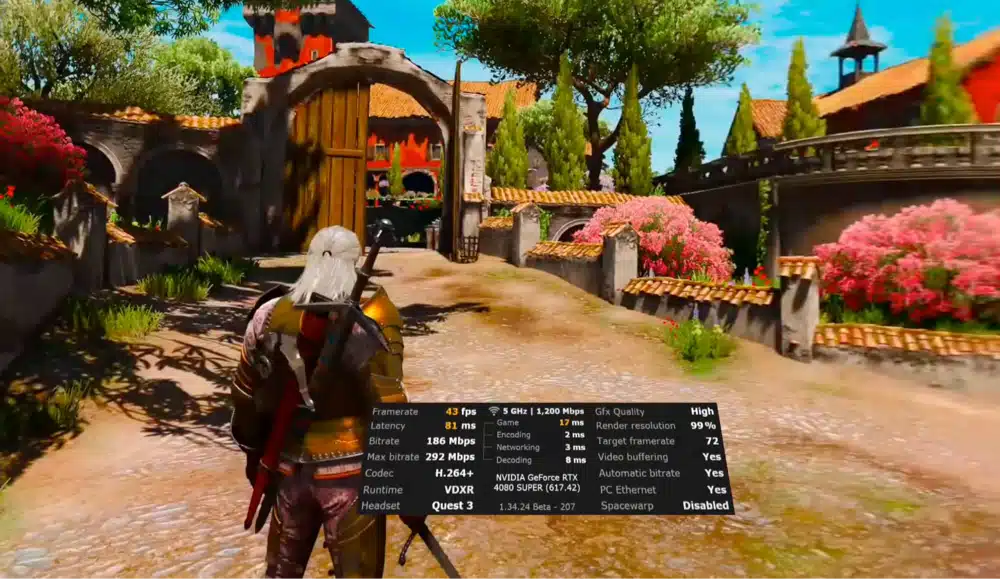
Yes. The mod is called Witcher 3 VR and lives in the witcher3-vr repository on GitHub. It’s built on DirectX 12 and talks to your headset through OpenXR. According to the project page, it gives you:
- Configurable stereo rendering, with three render modes
- A movable VR HUD with an in-game HUD editor
- A first-person mode for exploring, fighting, riding and sailing
- Cinema modes in 5:4, 4:3, 16:10 and 16:9
- DLSS, DLAA and TAAU support on the right modes
- Optional frame generation for VR (OFXR)
- ReShade and OptiScaler integration, picked from a launcher
Two of those matter most in day-to-day play: the HUD editor and Cinema Mode. A flat game pins its HUD to the edges of the picture, which is awkward in a headset, and cutscenes need somewhere to play. I cover both below.
It’s also still in development. Every release so far is labeled a pre-release, and the developer warns that some features may be incomplete, unstable or incompatible with some hardware. I’d treat it as a very good beta, not a finished product.
Witcher 3 VR Mod Luke Ross: Is There a Luke Ross Witcher 3 VR Mod?
People search for a Luke Ross version of this mod, but I couldn’t find one. Luke Ross is known for VR mods for other games, such as Red Dead Redemption 2 and Grand Theft Auto V, and the Witcher 3 mod in this guide is a separate project by a different developer. UEVR won’t help either, since that tool is built for Unreal Engine games and The Witcher 3 runs on CD Projekt’s own engine.
Witcher 3 Remastered VR Mod: Does the VR Mod Work With Remastered?
No. The mod does not work with Witcher 3 Remastered. The README asks for The Witcher 3 Next-Gen (2022), v4.0.4, DirectX 12 version, and it says Remastered support is not yet planned. When a user asked about it on GitHub, the developer said he had no estimate and expected the Remastered changes to break the mod.
Remastered launched on September 29 as a free upgrade for existing owners on Steam, GOG and Epic. If you let your game update on its own, you’re probably on Remastered now. That’s why this guide has a rollback step before the install steps.
Witcher 3 Next-Gen vs Remastered vs Classic: Which Version You Need
| Version | Steam branch | Works with the VR mod? |
|---|---|---|
| Classic (1.32, from before the December 2022 update) | classic | No, the mod needs Next-Gen |
| Next-Gen (4.04) | next-gen | Yes, this is the supported version |
| Remastered | Default (no beta selected) | No |
How to Roll Back Witcher 3 Remastered to Next-Gen 4.04 (Steam, GOG and Epic)
Back up your saves first. Copy the whole Documents\The Witcher 3\gamesaves folder somewhere safe. CD Projekt Red says older saves load in Remastered (with skill points reset), but it hasn’t said that saves made in Remastered will load in 4.04, so I’d start from a save made on Next-Gen.
Steam:
- Right-click The Witcher 3: Wild Hunt in your Steam library and choose Properties.
- Open Game Versions & Betas.
- Pick the next-gen branch (Patch 4.04). Don’t pick classic, which is the older 1.32.
- Let Steam download the files. You don’t need to uninstall first.
- Launch the game once and check the version number on the main menu.
CD Projekt Red’s own rollback page only mentions the Classic branch, so go by the branch names you see on screen. To go back to Remastered later, set the dropdown to None.
GOG Galaxy:
- Open Installed, select the game, then choose Manage Installation and Configure.
- Set Beta Channels to the Next-Gen channel.
- Turn off automatic updates, click OK, and wait for the download.
To go back to Remastered on GOG, set Beta Channels to Disabled and turn updates back on.
Epic Games Store: you can’t roll back. CD Projekt Red’s support page says Epic only provides the latest version, so the mod isn’t an option on Epic unless your install is still on the old build.
Witcher 3 VR Mod Requirements
The project page asks for the following. You need your own copy of The Witcher 3 on Steam or GOG, since the mod doesn’t include any game files.
- The Witcher 3 Next-Gen (2022), v4.0.4, DirectX 12 version
- A working OpenXR runtime for your headset
- A mouse and keyboard, or a gamepad
- Windows 10 or Windows 11
- A VR-ready GPU and CPU
- The current Microsoft Visual C++ Redistributable
Witcher 3 VR Mod System Requirements: GPU and CPU
The README doesn’t list minimum or recommended PC specs, so there’s no official number to quote. What it does say is that The Witcher 3 is CPU-bound in busy cities and the VR mod adds more CPU load, so a recent high-end CPU matters for steady frame rates there. DLSS and DLAA need an NVIDIA GPU, and OptiScaler’s DLSS route is for RTX 40 and 50 cards.
For a reference point, one published benchmark used an RTX 4080 Super and a Quest 3 over wireless and hit a 72 fps target on the Ultra preset with DLSS Quality. If you’re not sure your PC can handle VR at all, run my PC VR ready checker and read my guide to the best GPU for VR.
Which VR Headsets Work With the Witcher 3 VR Mod?
- Meta Quest 3 through Virtual Desktop and its VDXR runtime. This is the setup the developer tests most, and the README recommends VDXR for Quest headsets.
- Pimax headsets through SteamVR OpenXR. This is the other most-tested setup.
- Other OpenXR runtimes may work, but the README says they need more user feedback.
- VR motion controllers are not supported on any headset.
The Steam Frame isn’t listed. Someone opened a request for Steam Frame support in September. SteamVR OpenXR is listed as supported, so streaming from your PC through SteamVR is the route I’d try, but treat it as untested.
If you’re deciding between headsets, my Steam Frame vs Meta Quest 3 comparison covers the differences.
Witcher 3 VR Mod Download: Which Release to Get
Download the mod from the releases page on GitHub and nowhere else. Every release is flagged as a pre-release. The newest one I covered is v0.9.8v2 Hotfix (V1581), which fixed missing subtitles and dialogue text during Full VR cutscenes.
The file you want is Witcher3VR-v0.9.8v2-V1581-Main.zip. Skip the RenderDoc Add-on, which is only for diagnostic captures. When a new version comes out, install the whole package again rather than swapping single DLLs, because replacing only the DLL can leave incompatible files behind.
How to Install the Witcher 3 VR Mod (Step by Step)
The install is a copy-and-run job. Do the steps in order, and connect your headset (see the Quest and SteamVR sections below) before Step 5.
Step 1: Install Witcher 3 Next-Gen 4.04 With DirectX 12
Roll back to Next-Gen using the steps above, then launch the game once and confirm it starts on the 4.04 build. Set the game to DirectX 12, which is what the mod expects and what the project recommends. Take your other Witcher 3 mods out too. The developer doesn’t support the VR mod alongside other mods while it’s in development, and asks people to reproduce bugs on a clean install.
Step 2: Download the Witcher3VR Zip From GitHub
Open the releases page and download the Main zip for the latest release.
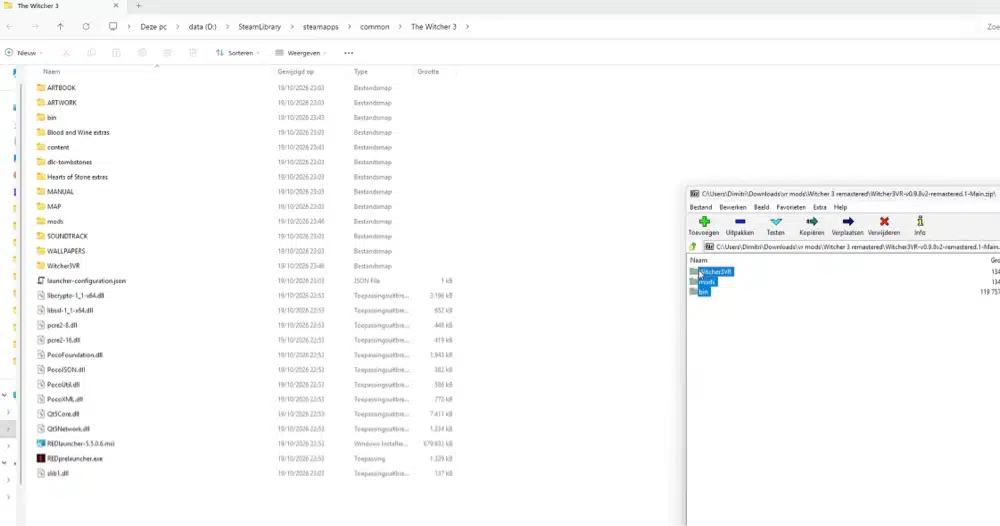
Step 3: Extract the Zip Into Your Witcher 3 Game Folder
Open the folder that contains the bin, content and mods folders. On Steam, right-click the game, choose Manage, then Browse local files. Extract the zip there, merge the folders, and overwrite the package files when Windows asks.
Step 4: Run Witcher3VRLauncher and Pick Off, ReShade or OptiScaler
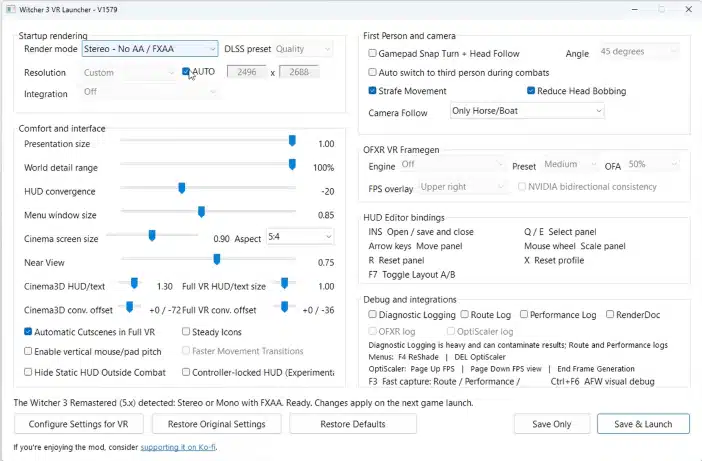
Go to bin\x64_dx12 and run Witcher3VRLauncher.exe. The launcher has an integration dropdown with four choices: Off, OptiScaler, ReShade, and OptiScaler + ReShade. The default is Off, and that’s where I’d start, because it gets you into VR with the fewest moving parts.
OptiScaler is the DLSS 5 route. It needs a DLSS or DLAA render mode and a compatible nvngx_dlssnr.dll for your RTX 40 or 50 card, which the mod doesn’t include. Put that file in bin\x64_dx12\witcher3vr-dlss5-reference, and turn off DLSS Override before you use it.
Step 5: Press Configure Settings for VR, Then Save & Launch
Press Configure Settings for VR at least once before you play. It applies the tested game profile and makes a backup, and Restore Original Settings puts your old settings back. Leave Resolution on AUTO to start, since it follows your headset and runtime. Pick a render mode (more on those below), then choose Save & Launch.
Always start the game through the launcher. The frame generation feature only loads that way. Put the headset on, load a save, and press F9 to recenter your view.
How to Play Witcher 3 in VR on Meta Quest 3 (Virtual Desktop, Steam Link or Link Cable)
The mod is a PC game, so a Quest 3 plays it by streaming from your PC. The developer’s most-tested setup is a Quest 3 through Virtual Desktop using its VDXR runtime, and that’s the route I’d start with.
Witcher 3 VR With Virtual Desktop (VDXR)
- Buy Virtual Desktop in the Meta Store and install the Streamer on your PC. My Virtual Desktop setup guide covers the router and Wi-Fi side.
- In Virtual Desktop’s settings, set the OpenXR runtime to VDXR. The options are Automatic, SteamVR and VDXR.
- Connect your Quest to your PC from Virtual Desktop.
- On the PC, run Witcher3VRLauncher.exe and choose Save & Launch.
Don’t chase the highest streaming resolution. The developer’s release notes say Virtual Desktop’s High setting with asymmetric projection (now the default) looks better than the Godlike setting with symmetric projection, so you can step down and keep the same quality.
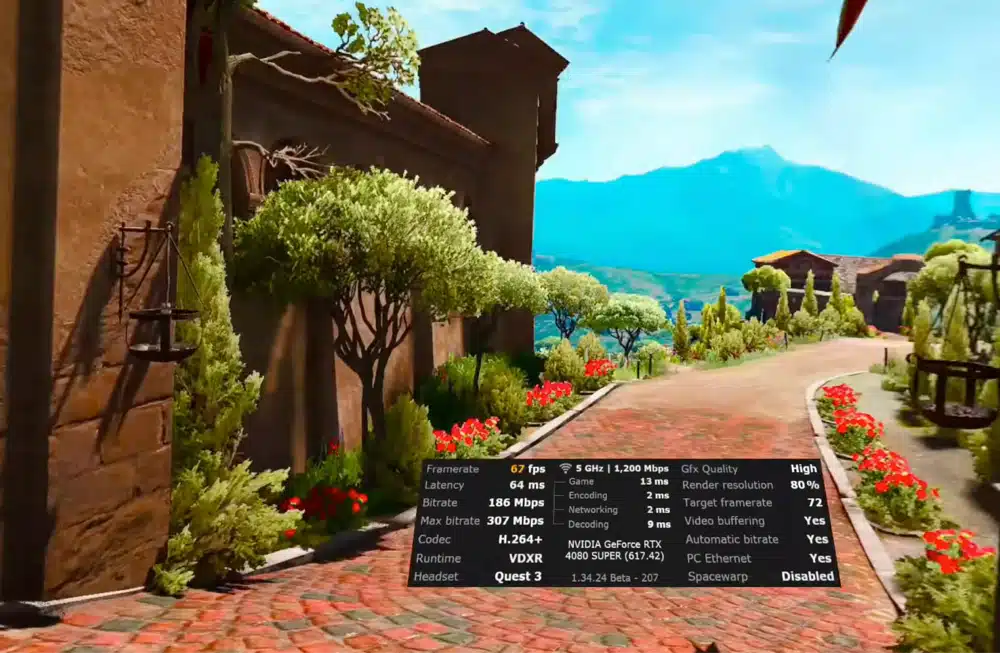
For a sense of what to expect, the published benchmark I mentioned above ran a Quest 3 over 5 GHz Wi-Fi with VDXR and the H.264+ codec. It held 72 fps on the Ultra preset with DLSS Quality at about 45 ms latency. Dropping to the High preset with DLSS Balanced cut latency to about 32 ms.
Witcher 3 VR With Steam Link or Meta Link
Steam Link runs through SteamVR, and the README lists SteamVR OpenXR as supported at the standard Presentation Size. My Steam Link on Meta Quest guide walks through the connection. Meta Link, over a cable or Air Link, uses Meta’s own OpenXR runtime, which isn’t one of the specifically tested setups. The project says other runtimes may work and need feedback.
That matches what I found in the project’s issues. One Quest 3 user on a Link cable with Meta’s runtime reported a black headset screen on several builds while the game kept running on the monitor. If that happens to you, switch to Virtual Desktop or Steam Link.
Witcher 3 VR on Oculus Quest 2 and Quest Pro
The README groups Quest headsets together under VDXR and names the Quest 3 as the most-tested one. A Quest 2 or Quest Pro uses the same Virtual Desktop setup, but I couldn’t find tested results for them. Expect a lower-resolution image and less performance headroom than on a Quest 3, and start with a lower resolution and the AER + AFW render mode.
Witcher 3 VR on Pimax, Valve Index, Steam Frame and Other SteamVR Headsets
For a headset that runs through SteamVR, make SteamVR your OpenXR runtime (in SteamVR, open Settings, then Developer, and choose Set SteamVR as OpenXR runtime). Then run the launcher as usual. SteamVR OpenXR is listed as supported, and Pimax headsets through SteamVR are one of the two setups the developer tests most.
A Valve Index or another OpenXR headset should work through the same route, but it falls under the README’s ‘may work, needs feedback’ line. If you try one, the developer asks people to report their headset, runtime and settings on GitHub.
Witcher 3 VR Controls: Gamepad, Keyboard and Hotkeys
You play with a gamepad, or with a keyboard and mouse. The mod adds no motion controls, and none are planned. I’d go with a gamepad, because you’ll have a headset on and a keyboard is hard to find by feel. The mod adds a set of hotkeys on top of the normal game controls:
| Key | What it does |
|---|---|
| F2 | Switch between asymmetric and symmetric projection (a testing toggle) |
| F3 | Write the recent route and performance log events |
| F7 | Switch between the VR and Cinema3D HUD layouts |
| F8 | Toggle Standard and Near views |
| F9 | Recenter the VR view |
| F10 | Toggle Cinema Mode |
| F11 | Toggle First Person |
| Insert | Open the HUD editor, or save and close it |
F9 and F10 are the two you’ll reach for most. Recenter with F9 after loading a save, and switch to Cinema Mode with F10 when a cutscene starts looking wrong.
In the HUD editor, Q and E pick the previous or next panel, the arrow keys move it, the mouse wheel resizes it, R resets the panel and X resets the whole layout. Hotkeys can clash with overlays or other software, so if a key does nothing, disable or rebind whatever else is using it.
Best Witcher 3 VR Settings for Performance
The Witcher 3 is already CPU-limited in busy cities, and the VR mod adds to that. So the goal is to get the GPU side working first, then give up some quality for CPU headroom if the cities stutter.
Witcher 3 VR Mode: AER + AFW vs Stereo vs Mono Explained
| Mode | What it does | Anti-aliasing and upscaling |
|---|---|---|
| AER + AFW | The fastest stereo option. Best when you need the highest frame rate | TAAU, DLSS or DLAA |
| Stereo | Renders both eyes every frame. Better image consistency at a higher cost | No AA, FXAA, TAAU, DLSS or DLAA |
| Mono | The lightest mode. No stereo depth, and still preliminary | No AA, FXAA, TAAU, DLSS or DLAA |
On an NVIDIA card I’d start with AER + AFW and DLSS, then move to Stereo only if you have frame rate to spare and want a steadier image. Asymmetric projection is on by default and gives the intended image and performance path, so leave it alone unless you’re diagnosing a visual problem.
Witcher 3 VR DLSS, DLAA and OptiScaler: What to Pick
Plain DLSS or DLAA from the AER + AFW mode is the lower-risk place to start. OptiScaler is the mod’s only launcher-managed DLSS 5 Neural Rendering route, and the developer warns that intermittent crashes can happen with it. If you want to try it, you’ll need the separate DLL from Step 4. If the game starts crashing, go back to Off in the integration dropdown.
Witcher 3 VR Frame Generation (OFXR): Is It Worth Turning On?
OFXR is a frame generation system for VR that uses optical flow. The README says both FidelityFX and NVIDIA Optical Flow gave about a 40% frame-rate increase in current testing, with the NVIDIA option usually looking cleaner and FidelityFX showing more artifacts. It’s experimental, tested mostly with VDXR, and it only loads when you start the game from the launcher. Some FPS overlays also report half the real frame rate while it’s on.
My advice is to get a stable frame rate without it first. Turn OFXR on only if you still can’t reach your headset’s refresh rate, and remember it’s listed alongside the crashes and black screens in the known issues.
Best Witcher 3 In-Game Graphics Settings for VR
These are starting points from the README, not strict rules:
- DirectX: DX12
- Ray tracing: off (it’s not supported yet)
- Screen-space reflections: off or low (High causes stereo artifacts)
- NVIDIA Reflex: off
- Motion blur and blur: off
- Bloom: off if it causes discomfort or visual artifacts
- Lens effects: off if they look detached in VR
- Shadows: High or lower when you’re CPU-limited
- HairWorks: off
- VSync: off
- Frame-rate limit: off, or set to suit your headset and frame generation mode
Most of that list removes screen effects designed for one flat picture. That fits the project’s notes that motion blur, bloom and lens effects look detached in VR and that high screen-space reflections produce stereo artifacts.
Texture Quality also changes how far detailed objects stay visible. The README suggests Medium with No AA or FXAA, Medium or High with TAAU or DLSS, and higher values with DLAA if you have the performance. Higher values can add shimmering in the distance.
Two sliders in the launcher help too. Presentation Size defaults to 1.00. Lowering it shows the same pixels in a smaller part of your view, which looks sharper without raising render resolution, but it can leave empty space around the picture. World Detail Range defaults to 100%. Lowering it helps in cities by cutting how far detailed objects stay visible, and at 40% the extended draw-distance correction is effectively off. Use the highest value that stays stable.
Witcher 3 First Person VR and Cinema Mode: How Cutscenes and Combat Play
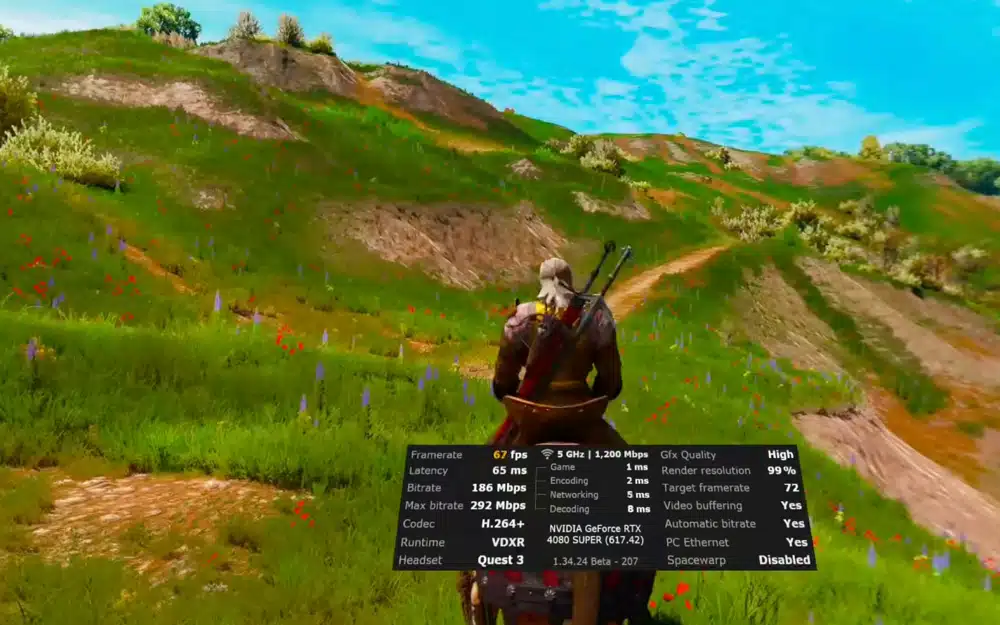
First-person mode (F11) works for exploring, fighting, riding Roach and sailing. Some animations and unusual camera situations still look better in third person, and there are known issues when moving backward and in scripted sequences.
Cutscenes are the rougher part. The game’s cinematics use cameras that were never meant to be seen in 3D, and some terrain can still look wrong in a few Full VR cutscenes. The developer’s own advice is to use Cinema Mode (F10) for cutscenes that are free of artifacts. It shows the picture on a big virtual screen in 5:4, 4:3, 16:10 or 16:9. The Far and Distant game camera modes aren’t corrected, only the close ones, which is what F8 switches between.
Witcher 3 VR Motion Sickness: Comfort Tips
Moving a first-person camera with a thumbstick is a common trigger for VR nausea, so go in gently. The README says motion blur, bloom and lens effects can look uncomfortable or detached in VR, so turn those off first. Press F9 to recenter after loading a save, keep your frame rate steady (my guide to boosting VR frame rates helps), and take short sessions at first. More tips are in my VR motion sickness guide.
Witcher 3 VR Mod Not Working? Fixes for Common Problems
The Game Does Not Enter VR
- Confirm the correct OpenXR runtime is active for your headset.
- Turn off Windows HDR.
- Close RivaTuner Statistics Server (RTSS) and any overlay that uses it.
- Start the game through bin\x64_dx12\Witcher3VRLauncher.exe.
- Temporarily disable overlays and other DLL injectors.
- Reinstall the whole release package instead of replacing only the DLL.
Black Screen in the Headset or a Crash on Start
Intermittent crashes, hangs and black-screen starts are known issues, mostly when frame generation or the integrations are on, including ReShade with AER. If you’re affected, turn off OFXR and set the integration dropdown to Off. In one report the headset stayed black while the game ran on the monitor, and the picture showed up when Cinema Mode (F10) was toggled, which tells you the game is running and the VR view is the problem. If that user’s pattern matches yours, try a different render mode and check the HDR and RTSS points above.
Witcher 3 VR Mod Stopped Working After a Game Update
The mod is built for 4.0.4, so check your game version first. On Steam, the default branch is Remastered, so an update can swap your build out from under the mod. Set the branch back to next-gen. In September a user also reported script errors after a 4.04b game update. The developer called it a CD Projekt Red scripting problem and suggested going back to 4.04a, and the report was closed. If you see script compile errors, check the game version before anything else.
Windows Security Flags Witcher3VRLauncher.exe as a Trojan
One user reported that Windows Security flagged the launcher as a Trojan after they copied the files, and called it a false positive. The developer’s answer was that the code is public in the repository, and anyone who doesn’t trust the compiled launcher can build it from source. Only download from the official releases page, and don’t switch your antivirus off to get around it. If you’re not comfortable, build the launcher yourself or skip the mod.
Poor Frame Rate in Novigrad and Other Cities
- Lower World Detail Range gradually.
- Reduce shadows, crowd density and background characters.
- Try AER + AFW instead of full Stereo.
- Reduce render resolution before you lower texture quality.
- Test OFXR with VDXR if native performance still isn’t enough.
The Picture Looks Distorted After Changing Presentation Size
Set Presentation Size back to 1.00.
Witcher 3 VR Mods and Alternatives: vorpX and Other Ways to Play
vorpX is a separate paid tool that adds VR to many flat games. A forum user reported that its official Witcher 3 profile works with 4.04 on GOG, with a script error along the way. Treat that as a lead worth checking, not something I’ve confirmed.
The older Witcher Reality Project, from 2020, rebuilt the Kaer Morhen opening in Unreal Engine for VR, and coverage at the time said combat and conversations didn’t work. Neither option gives you the full game in first-person stereo 3D the way this mod does.
Is the Witcher 3 VR Mod Worth Playing?
Yes, if you have a strong NVIDIA PC, you’re happy with a gamepad and you don’t mind rolling back to 4.04. Seeing Velen or Novigrad with real depth and head tracking is a very different way to play a game this big.
Skip it if you want to swing a sword with motion controllers, if you’ve moved to Remastered and want to stay there, or if you don’t want to deal with a pre-release that can crash. For a first session, I’d use a Quest 3 through Virtual Desktop, AER + AFW with DLSS, ray tracing off, and Cinema Mode for cutscenes.
Witcher 3 VR FAQ: Safety, Controllers, Remastered and More
Is the Witcher 3 VR mod free?
Yes. The mod is free and open source under the MIT license, and every release is on GitHub. You still need your own copy of The Witcher 3. Donations to the developer are optional and don’t buy exclusive builds or support.
Is the Witcher 3 VR mod safe?
The source code is public on GitHub, so you can inspect it. One user reported that Windows Security flagged the launcher as a Trojan, and the developer’s answer was that anyone who doesn’t trust the compiled file can build it from source. Download it only from the official releases page, and don’t turn off your antivirus to get around a warning.
Does the Witcher 3 VR mod work with Witcher 3 Remastered?
No. The mod needs the Next-Gen version (v4.0.4, DirectX 12). If you’re on Remastered, roll back with the next-gen branch on Steam or the Next-Gen beta channel on GOG, then install the mod.
Will the Witcher 3 VR mod support Remastered?
The README says Remastered support is not yet planned. When asked, the developer said he had no estimate. Check the GitHub releases page for news.
Does the Witcher 3 VR mod support motion controllers?
No. You play with a gamepad or a keyboard and mouse. Motion controllers are not supported and not currently planned.
Can you play Witcher 3 in VR on Quest 3 without a PC?
No. The mod runs on a Windows PC, and the Quest streams the game from it through Virtual Desktop, Steam Link or a Link cable. Virtual Desktop with the VDXR runtime is the most-tested route.
Do I need an NVIDIA GPU for the Witcher 3 VR mod?
DLSS, DLAA and OptiScaler’s DLSS route need an NVIDIA GPU, and the OptiScaler route is for RTX 40 and 50 cards. The AER + AFW mode also offers TAAU, and the frame generation tool has an AMD FidelityFX option. The README doesn’t set a GPU brand requirement, but I couldn’t find AMD-specific test results, so expect to lean on lower resolution settings.
Does the Witcher 3 VR mod work on the Epic Games Store or Xbox Game Pass version?
Epic doesn’t let you roll back to the 4.04 build, so it’s a poor fit unless your install is still on the old version. For Xbox Game Pass, an open bug report says the HUD editor setup fails because a file is missing in that install. Steam and GOG are the safe choices.
Can I use other Witcher 3 mods with the VR mod?
You can try, but other mods aren’t supported while the VR mod is in development. If you report a bug, the developer asks you to disable all other mods first and reproduce it on a clean install.
Is the Witcher 3 VR mod still being updated?
Yes. The project has had a new release every one to three weeks, and it’s still labeled a pre-release. Check the GitHub releases page for the newest version before you install.
Can you play Witcher 3 in VR on PS5 or PSVR2?
Not with this mod. It’s a Windows 10 and 11 PC project, and it doesn’t run on a PlayStation.
Is the Witcher 3 VR mod the same as the first-person Witcher 3 mod?
No. A first-person mod changes the camera on a flat screen. The VR mod renders a separate view for each eye and tracks your head, and it includes its own first-person mode.
Final Thoughts
The Witcher 3 VR mod is a free way to play a game this big with real depth and head tracking. The setup is short once your game is on the right build: roll back to Next-Gen 4.04, extract the zip, run the launcher and press Configure Settings for VR.
My advice is to start with a Quest 3 through Virtual Desktop or a SteamVR headset, keep the upscaler on Off or plain DLSS, and check the GitHub releases page now and then, because new builds arrive often. If you want to try more mods like this, start with my DOOM Eternal VR mod guide, then the Modern Warfare 2 VR mod and Titanfall 2 VR mod guides.