The Diablo 2 VR mod turns Diablo 2 Resurrected into a game you play inside a headset. There are two free mods that do it, D2R VR and D2R VR Unleashed, and they work differently enough that you should pick one before you download anything. In this guide I’ll show you how to install the Diablo 2 VR mod and play it on a Meta Quest 3, a Steam Frame, a Valve Index or another PC VR headset.
Either way, you need your own copy of the game (Diablo II: Resurrected on Steam) and a Windows PC. Both mods are for offline single player only, so a local offline character is the only way to use them. Online play with a modded game can get your account banned, and I’ll cover that in its own section.
Related: Check out the VR4ALL VR mod app and quickly install VR mods on your Meta Quest!
The Diablo 2 VR Mod at a Glance
| Detail | D2R VR | D2R VR Unleashed |
|---|---|---|
| Creator | BodyWalkVR (code on GitHub under the account natpoh: diablo2-vr-port) | bearstonem (d2r-pcvr), built on D2R VR |
| Price | Free (you need your own copy of the game). MIT license | Free (you need your own copy of the game). MPL 2.0 license now, MIT for older releases |
| Offline only | Yes | Yes |
| Play style | Four camera views: overhead, third person, game on your floor and a first-person preview. Controllers act like a gamepad in most views | First-person motion combat: swing weapons, draw a bow, drink potions from your belt |
| Headsets | OpenXR PC VR headsets, Quest through Virtual Desktop or Link, Steam Frame controller layout | Steam Frame, Meta Quest 3 (Steam Link or Virtual Desktop), SteamVR headsets. Quest 2 not confirmed |
| Game versions | Steam and Battle.net copies work if they match the tested build | Steam copies. The Battle.net copy is experimental |
| Download | Installer from bodywalkvr.com or GitHub Releases | Setup EXE or portable zip from GitHub Releases |
| Release state | Regular releases | Every release is marked a preview on GitHub |
| Flat monitor mode | Yes, mouse and keyboard | Not a feature. The VR launchers are separate from the normal desktop Play button |
Can You Play Diablo 2 in VR? Is There a Diablo 2 VR Mod?
Yes, but only through a mod. Diablo 2 Resurrected has no built-in VR mode, and Blizzard doesn’t support one. The community has filled that gap with two projects, and both run as plugins on top of a game loader.
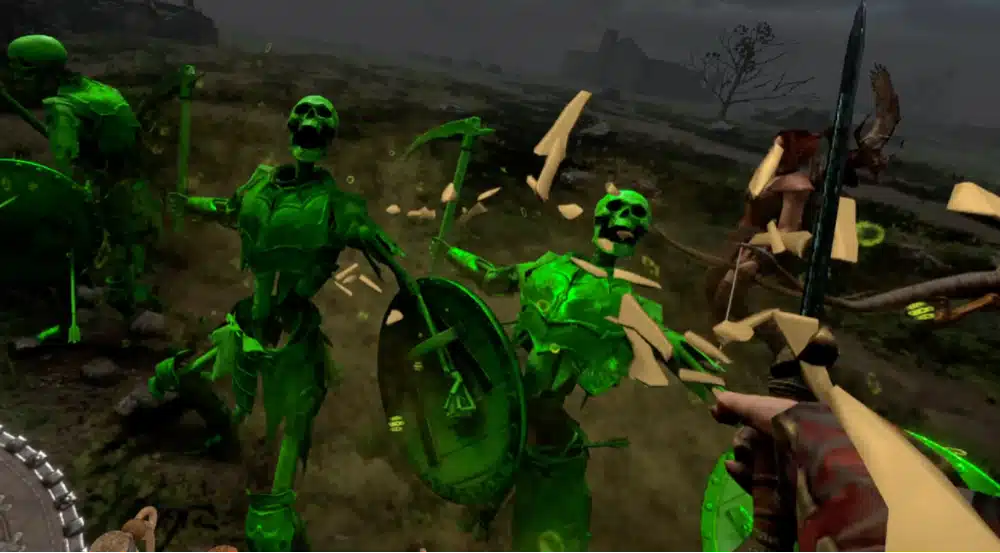
D2R VR came first. It draws the game in stereo 3D, so the classic overhead view suddenly has depth. Unleashed is a fork of D2R VR that goes further on the motion-control side, with a guided Windows installer, native OpenXR support and combat you do with your hands. If you want the short version, D2R VR is the broader and more established mod, and Unleashed is the one to try if you want Diablo to feel like a VR action game.
Diablo 2 Resurrected VR Mod: D2R VR vs D2R VR Unleashed
Here is how I’d choose between them. Neither mod is perfect, and both are changing quickly, so treat this as a starting point rather than a ruling.
| If you want… | Pick |
|---|---|
| The widest range of ways to play, including a flat monitor mode and a floor-level view of the whole map | D2R VR |
| Regular, stable-labeled releases | D2R VR |
| To swing your weapon, draw a bow and drink potions with your hands | D2R VR Unleashed |
| A guided installer that picks the right launcher for SteamVR or Virtual Desktop | D2R VR Unleashed |
| To use a Meta Quest 3 or Steam Frame with the least setup | D2R VR Unleashed |
| To play on a Battle.net copy of the game | D2R VR (Unleashed is experimental there) |
The two cannot share a game folder. Unleashed uses its own file names, so it won’t overwrite D2R VR, but its setup stops if it finds D2R VR in the same install. If you want to try both, use two separate game copies or uninstall one first.
What Is D2R VR (the BodyWalkVR Diablo 2 VR Mod)?
D2R VR is a free, open-source plugin for the D2RLoader mod loader. It lets you look at Diablo 2 in four ways: the original overhead camera in real 3D, a third-person camera behind your hero, the whole game laid out on your floor like a table-top diorama, and a first-person view where your hands hold the weapon.
The project labels the first-person view a preview, and I’d treat it that way. It also runs on a flat monitor with mouse and keyboard if you want to try the mod before putting a headset on.
What Is D2R VR Unleashed (the D2R PCVR Fork)?
D2R VR Unleashed, previously called D2R PCVR, builds on D2R VR and adds native OpenXR support, motion combat, a physical bow, belt potions you pick up and drink, VR menus and a left-wrist display for health, mana and experience. Its GitHub page describes it as a preview, and every release is flagged that way, so expect rough edges.
The upside is that the person behind it updates it often. The downside is that controls and menus can change between releases, so read the release notes after you update.
Diablo 2 VR Mod Requirements
- Diablo II: Resurrected, bought and installed on your PC (Steam store page). Neither mod includes any of Blizzard’s files.
- Windows 10 or 11, 64-bit.
- A PC VR-capable headset with two tracked controllers for the best experience. Quest headsets work through Virtual Desktop, Steam Link or a Link cable.
- A local offline character. Online characters are not supported.
- For D2R VR: D2RLoader and ReShade with add-on support (the D2R VR settings app can fetch both).
Diablo 2 VR Mod System Requirements: PC and GPU
Neither project publishes minimum PC specs, so I won’t invent a number. Diablo 2 Resurrected is an older game and is easy on a modern graphics card in flat mode, but VR renders the picture twice at a higher resolution, so I’d treat a card that handles other PC VR games comfortably as the safe starting point.
If you’re not sure where your PC stands, my PC VR ready check and GPU for VR guide will help you decide.
Which VR Headsets Work With the Diablo 2 VR Mod?
| Headset | D2R VR | D2R VR Unleashed |
|---|---|---|
| Meta Quest 3 | Works through Virtual Desktop or a Link cable | Works through Steam Link with SteamVR, or Virtual Desktop with VDXR |
| Meta Quest 2 and Quest Pro | Same streaming routes as Quest 3, not specifically listed | Same routes as Quest 3, but compatibility is not confirmed |
| Steam Frame | A Steam Frame controller layout is included | Supported through SteamVR streaming |
| Valve Index and other SteamVR headsets | Works through OpenXR | Works through SteamVR |
| PS VR2 on PC | Mentioned in the project notes (the right controller’s Options button opens the menu) | Not listed |
If you use a Quest, you need a way to stream your PC to the headset, so read my Virtual Desktop on Meta Quest guide or Steam Link on Meta Quest guide first. The newer Steam Frame vs Meta Quest 3 comparison explains how the two headsets differ for PC games like this one.
Diablo 2 Resurrected Versions the VR Mod Supports
Both mods are tested against a specific build of Diablo 2 Resurrected, and a game patch can break them until the developer catches up. A Steam copy is the safest choice for both mods. The Battle.net copy works with D2R VR, and Unleashed lists it as experimental.
Check the “requirements” section of each project’s GitHub page for the exact tested build before you update the game.
Diablo 2 VR Mod Download: Which Installer to Get
Both mods are downloaded from their developers, not from a mod site. I couldn’t find a VR mod page on Nexus Mods, so be careful with any other site claiming to host a “Diablo 2 VR mod download”. Each GitHub release includes a SHA-256 file so you can check your download matches.
- D2R VR: the installer from the BodyWalkVR mod page or the GitHub releases page.
- D2R VR Unleashed: the setup EXE, or the portable zip if you’d rather not install anything system-wide, from the GitHub releases page.
Diablo 2 VR Mod GitHub: Where the Source and Releases Live
The D2R VR code lives at natpoh/diablo2-vr-port (the repository is called a “port”), and Unleashed lives at bearstonem/d2r-pcvr. The D2R VR source can’t be built as-is right now, so the installer is the only supported download. For most people that is the better route anyway.
How to Install the Diablo 2 VR Mod (D2R VR)
These steps cover D2R VR. If you picked Unleashed, skip to the next section.
Step 1: Own Diablo 2 Resurrected and Plan to Play Offline
Install the game from Steam or Battle.net and run it once so the files exist. Create or pick a single player character. Online characters are off limits for this mod.
Step 2: Run the D2R VR Installer
Download the installer and run it. It finds your game folder, installs the mod into a “mods” folder inside it and adds a D2R VR shortcut to your desktop. It can also add a free BodyWalk Lite component if you don’t already have BodyWalk. Choose the VR option, or the flat option if you want to try the mod on a monitor first.
Step 3: Install ReShade From the Settings App
D2R VR needs ReShade with add-on support and the Generic Depth add-on turned on, because that is how it reads the game’s depth for 3D. Open the D2R VR settings app, go to the Home tab and use the ReShade install button. You also need D2RLoader, which the setup can download and check for you.
Step 4: Set the Right Video Options (V-Sync Off, No TAA)
This is the step that fixes most of the “my picture looks wrong” problems. In Diablo 2 Resurrected’s video options, set:
- Vertical Sync: off. V-Sync halves the frames each eye gets.
- Anti-aliasing: FXAA or MSAA, not TAA. TAA breaks the stereo picture.
- Ambient Occlusion: medium.
- Framerate cap: 180, which gives 90 per eye.
- DLSS: on or off. The project says both work.
Step 5: Start Your Headset Runtime and Launch From the D2R VR Settings App
Turn on your headset’s OpenXR runtime (SteamVR, Virtual Desktop or the Oculus app), then start the game from the Home tab of the D2R VR settings app or from the D2R VR shortcut. Don’t launch from Steam or Battle.net, because that skips the loader and the mod never starts. The Home tab also runs a set of status checks and flags settings that will break the picture.
How to Install the Diablo 2 VR Mod: D2R VR Unleashed
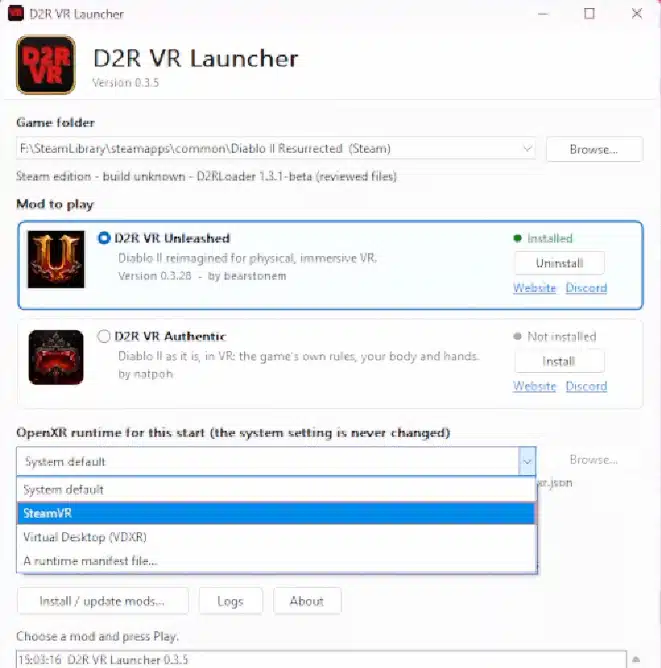
Unleashed uses a guided installer, which makes it the easier of the two to set up. You need the Steam desktop client running, even if you own the Battle.net copy, because setup adds shortcuts to your Steam library and needs an internet connection while it runs.
Step 1: Download the Setup EXE or Portable Zip
Open the releases page and download the setup EXE. If you’d rather not install anything, download the portable zip, extract it to a permanent folder and double-click the install command file inside it.
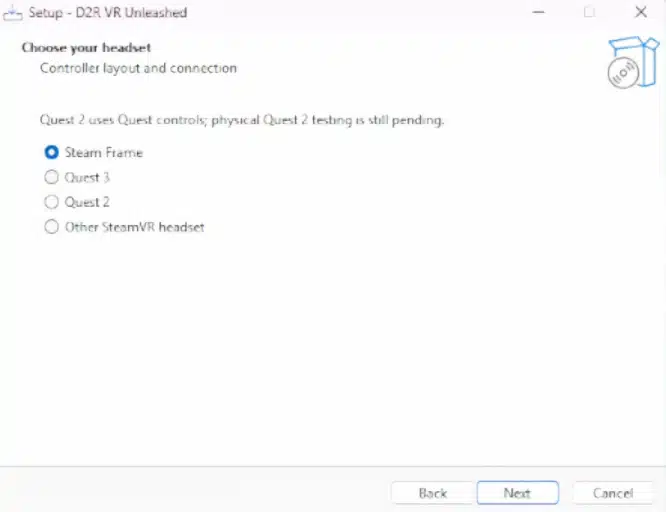
Step 2: Pick Steam or Battle.net, Your Headset and Your Connection
The wizard asks which store your game came from, which headset you have and how it connects (SteamVR or Virtual Desktop with VDXR). It detects the game folder and adds Steam library shortcuts for you.
Step 3: Launch With the SteamVR or VDXR Shortcut
Connect your headset and start the SteamVR or VDXR launch shortcut that setup created. For a Quest 3, that means Steam Link with SteamVR, or Virtual Desktop with its Windows Streamer running. Fully exit VR before you switch to desktop play or change your headset connection.
Step 4: Pick an Offline Character
When the game opens, choose an offline character. Update or repair the mod by running setup again, which keeps your calibration and video settings. To remove it, use the uninstall script in the zip, which leaves your characters and shared stash alone.
How to Play Diablo 2 in VR on Meta Quest 3 (Virtual Desktop, Steam Link or Link Cable)
A Meta Quest can’t run either mod by itself, because Diablo 2 Resurrected runs on your PC and the Quest displays it. Pair your headset with the PC first. Virtual Desktop is the route most people use for modded PC games, and a Steam Link setup works too. A Link cable is the third option.
Because the Quest only displays what your PC renders, your graphics card and your Wi-Fi or cable decide how smooth the game feels. Once the Quest is streaming your PC, install and launch the mod the same way you would for any other PC VR headset.
Diablo 2 VR Meta Quest 3 Setup With D2R VR Unleashed
Unleashed lists both Steam Link with SteamVR and Virtual Desktop with VDXR for the Quest 3. If you use Virtual Desktop, start its Windows Streamer on your PC before you run the VDXR launch shortcut. My Meta Quest 3 guide covers the headset itself if you’re still setting it up.
Diablo 2 VR on Steam Frame, Valve Index and Other SteamVR Headsets
On a SteamVR headset, start SteamVR first and then launch the mod. Unleashed lists the Steam Frame through SteamVR streaming, and D2R VR includes a Steam Frame controller layout. Valve Index owners use the standard SteamVR route. If you’re on another OpenXR headset, D2R VR’s native OpenXR mode is the one to try, and the project labels that mode a prototype.
Diablo 2 VR First Person: Views and Camera Options
The camera is where the two mods differ most.
D2R VR 3D Views: F1 Overhead, F2 Third Person, F3 Floor Diorama
| Key | View | What it’s like |
|---|---|---|
| F1 | Overhead | The classic Diablo camera, now in real 3D |
| F2 | Third person | A free camera behind your hero that follows your head |
| F3 | Floor diorama | The game laid out on your floor so you can walk around it. Passthrough is used on Virtual Desktop |
| F4 | First person | Arms follow your controllers and the weapon sits in your hand. Marked as a preview |
| F12 | Cycle | Steps through the views |
Diablo 2 First Person VR (F4 Preview) vs Unleashed Motion Combat
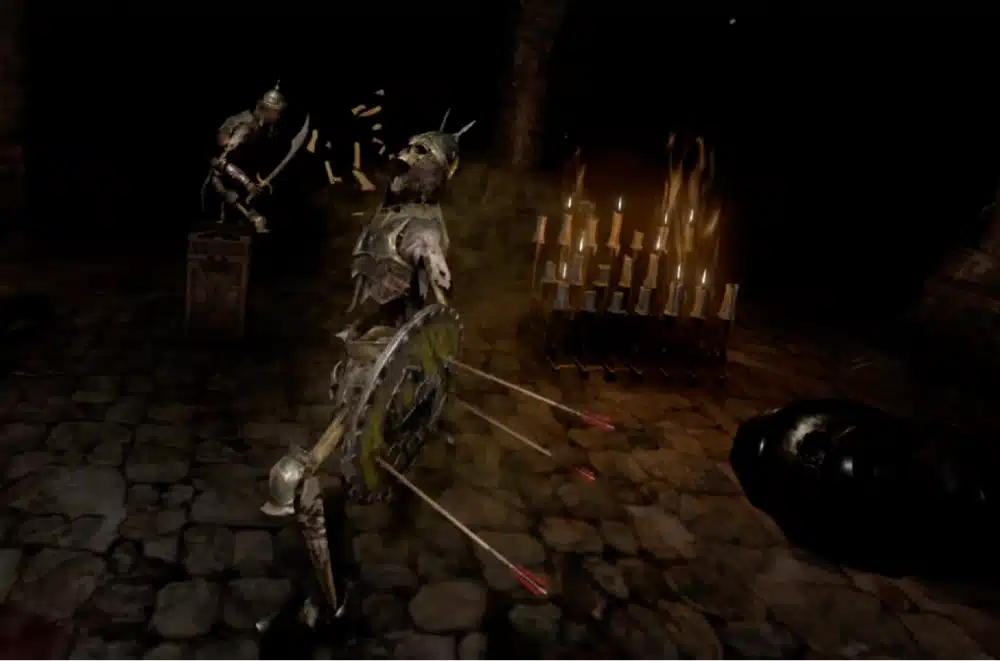
D2R VR’s first-person view is labeled a preview, and some weapons may sit or aim wrongly until you adjust them in the settings app’s Weapon Adjust tab. Unleashed is built around first person from the start, so this is the area where it goes further: you swing the weapon through enemies, hold a bow and draw it with both hands, and pick potions off your belt. The tradeoff is that Unleashed is VR only and every release is a preview.
Swinging your arms for a whole Diablo session is physical in a way a mouse click is not. If that sounds tiring, the D2R VR third-person or overhead view is the gentler option. If you’re prone to feeling queasy in headsets, my VR motion sickness guide has tips for easing in.
Diablo 2 VR Controls: Motion Controllers, Gamepad Mode and Hotkeys
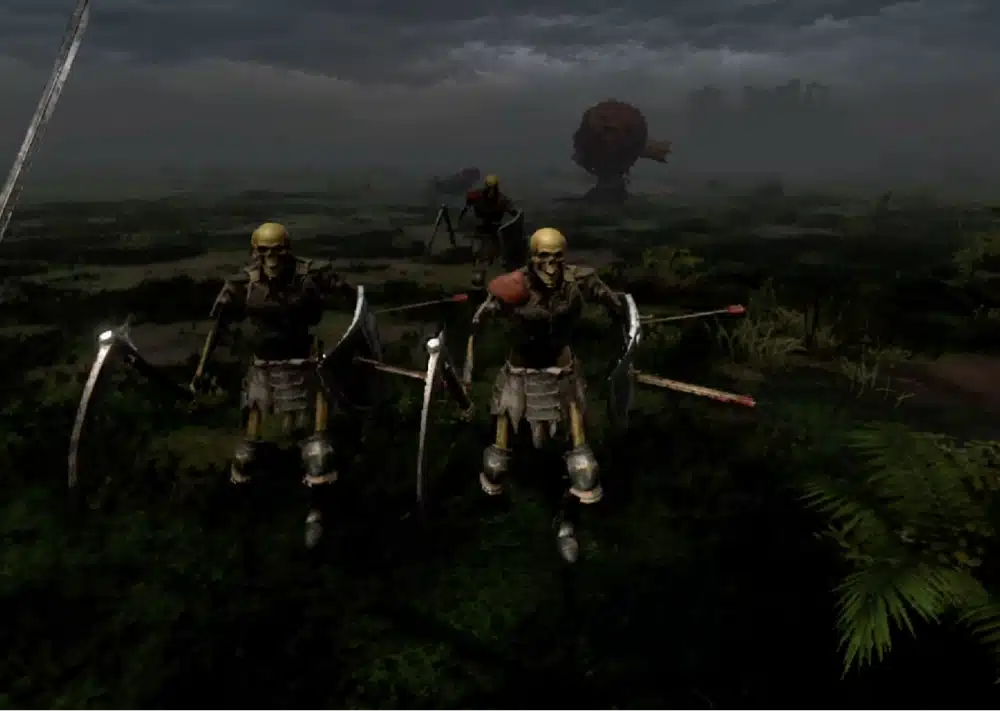
In D2R VR, your controllers act like a gamepad in the overhead, third-person and floor views, and the first-person controls (a prototype, on by default) cover swinging, bows and potions. You can rebind everything in its settings file or Controls tab. Unleashed uses hand wheels and physical actions.
| Action | D2R VR | D2R VR Unleashed |
|---|---|---|
| Walk and turn | Left stick walks, right stick turns | Left stick walks, right stick turns |
| Attack | Right trigger (first person) | Swing the weapon through the enemy |
| Pick up, open, talk | Right A (in first person) | Right A by default |
| Skills | Face buttons and left trigger as skill buttons; hold the right stick for the skill panel | Click a thumbstick to open that hand’s wheel, then use the other hand’s laser to assign skills |
| Potions | Grips drink belt potions | Grab a bottle from your belt, bring it to your mouth and tip it |
| Map | Click the left stick | Map tab, or the wrist display |
| Inventory | Menu button | Left grip plus left stick click, or the wheel’s inventory option |
| Recenter | Hold the right stick down | F11 on the PC keyboard |
| Bow | Right trigger fires | Right trigger near your left hand, then draw and release |
These mappings come from each project’s own documentation and can change between releases, so treat the in-game Controls tab as the final word.
Best Diablo 2 VR Settings for Performance and Comfort
- Turn Vertical Sync off, and use FXAA or MSAA instead of TAA, as covered in the install steps. These two settings break the 3D picture in D2R VR.
- Keep the framerate cap at 180 so each eye gets 90 frames.
- Use DLSS if your graphics card supports it, since the project says it works either way.
- If the picture looks squashed or square in the headset, check the VR render size slider in the D2R VR settings app. Dragging it toward the “window size” end often helps.
- In Unleashed, ordinary monsters’ health bars are hidden by default. Turn on “Weak monster bars” in VR Settings if you want them.
- Frame generation and elemental hand effects in Unleashed are experimental and off by default. Turn them on only if your PC has headroom.
Diablo 2 VR Multiplayer: Why the Mod Is Offline Only
Both mods work by injecting code into the game, and that is exactly what an online anti-cheat looks for. The developers say plainly that using them online can get your account banned, and neither project is made or endorsed by Blizzard. I wouldn’t risk a character you care about.
Stay on a local offline character, and if you want a cooperative game with friends, play the regular version without the mod.
Diablo 2 VR Mod Not Working? Fixes for Common Problems
The Game Looks Square or Squashed in the Headset
In D2R VR, set the VR render size to the headset’s recommended size, or drag the game window until it is square if you’re in windowed mode. Native OpenXR mode is a prototype, so this is the first thing to check.
V-Sync or TAA Breaking the 3D Picture
Open Diablo 2 Resurrected’s video options and make sure V-Sync is off and anti-aliasing is FXAA or MSAA. The D2R VR settings app’s Home tab flags both settings if they are wrong.
Controllers Not Detected or Buttons Doing Nothing
Make sure your headset’s runtime is running before you launch. In Unleashed, keep the game window focused on the PC when you use menus, and release your buttons and triggers when you open or close one, so a held input doesn’t carry over.
Weapons Sitting in the Wrong Place in First Person
That is a known limit of D2R VR’s first-person preview. Open the settings app’s Weapon Adjust tab and adjust the position and rotation for each weapon type by hand.
Both Mods Installed in the Same Game Folder
Unleashed’s setup stops if it finds D2R VR. Uninstall one of them, or keep a second copy of the game for the other mod.
Diablo 2 VR Reddit, YouTube and Discord: Where to Get Help
The best help is at the source. D2R VR has a community Discord with a diablo-2-vr channel linked from its mod page, and both GitHub pages accept issue reports. When you ask for help, include your headset, how it connects to the PC, which mod you installed and the contents of the log file the mod writes.
Is the Diablo 2 VR Mod Worth Playing?
I think the Diablo 2 VR mod is worth trying if you already own the game and a PC VR-capable headset, because the cost is an evening of setup and nothing else. D2R VR is the better pick if you want a flexible, steady experience and don’t mind the first-person view being a preview. Unleashed is the better pick if the idea of swinging a sword and drinking potions by hand is the whole appeal, and you accept that every release is still a preview.
Skip it if you want online play, because neither mod supports it, or if you expect polished hand-tracked combat on day one. Both projects are young, and both change every few days, which is exciting and a little unpredictable. If you’re after something more finished, my list of the best PC VR games has plenty that were built for a headset.
Diablo 2 VR Mod FAQ
Is the Diablo 2 VR mod free?
Yes. D2R VR and D2R VR Unleashed are both free to download from their developers. You still need to own Diablo II: Resurrected.
Is the Diablo 2 VR mod safe?
The source code for both mods is public on GitHub, and each release includes a checksum file so you can verify your download. Only download from the official links, and use the mods offline only. Using them online can get your Blizzard account banned.
Can you play Diablo 2 in VR online or with friends?
No. Both mods are for offline single player only. Injecting code into the game online can get your account banned, and neither mod is endorsed by Blizzard.
Do I need to own Diablo 2 Resurrected to use the VR mod?
Yes. Neither mod includes any of Blizzard’s files, so you need your own installed copy of the game on your PC.
Can you play Diablo 2 in VR on Quest 3 without a PC?
No. Both mods run on a Windows PC, and the Quest 3 shows the game by streaming it through Virtual Desktop, Steam Link or a Link cable.
Can you play Diablo 2 in VR on PS5 or PSVR2?
Not on the console. Both mods run on a Windows PC. D2R VR’s notes mention PS VR2 controllers on a PC, but I haven’t found a way to use either mod on a PS5.
Is Diablo 2 VR real?
Yes. It’s a fan-made mod rather than an official release, but both D2R VR and D2R VR Unleashed are real, working projects you can download and use today.
Does the Diablo 2 VR mod work with Reign of the Warlock?
I couldn’t confirm it. Neither project’s documentation mentions the Reign of the Warlock expansion, so check each GitHub page and the community Discord before you update the game.
Can I use D2R VR and D2R VR Unleashed at the same time?
No. They can’t share a game folder, and Unleashed’s setup stops if it finds D2R VR. Pick one, or keep a separate copy of the game for each.
Will I get banned for using the Diablo 2 VR mod?
Not if you stay offline. The developers warn that injecting code into the game while playing online can get your account banned, so use a local offline character.
Final Thoughts
The Diablo 2 VR mod comes in two versions, so you can choose the style that suits you. Start with D2R VR if you want the safe, flexible route, or with Unleashed if you want to swing a sword with your own arm. If you enjoy this kind of project, my guides to the Titanfall 2 VR mod and the F.E.A.R. VR mod are good next installs, and my roundup of the best PC VR games covers games built for a headset from the start.