
The Spider-Man Remastered VR mod puts you inside Insomniac’s New York as Spider-Man, with head and hand tracking, web swinging you steer with your own arms, and punches you actually throw. In this guide I’ll show you how to install and play Spider-Man Remastered VR on a Meta Quest 3, Steam Frame or another PC VR headset. It’s free, it’s open source, and it installs from one zip file without touching your game folder.
Marvel’s Spider-Man Remastered was never built for a headset, which is why this mod is getting so much attention. The mod is called Spidy and it comes from a solo developer named Ilya Mezerowsky.
Spider-Man Remastered VR Mod at a Glance
| Detail | Answer |
|---|---|
| Creator | Ilya Mezerowsky (the project is called Spidy, or SpidyVR on GitHub) |
| Price | Free (you need your own copy of the game) |
| Game it works with | Marvel’s Spider-Man Remastered on Steam, game version 4.630.0.0 |
| Version covered | 0.3.6 (early alpha) |
| Download | Spidy-0.3.6-win64.zip on GitHub (about 13 MB) |
| VR runtime | OpenXR (the launcher finds the one your headset uses) |
| Headsets tested | Meta Quest 3 through Virtual Desktop and through SteamVR (Steam Link). Other SteamVR headsets and Quest Link should work |
| Operating system | Windows (Linux through Steam Proton is experimental) |
| Memory | About 19 GB of RAM plus page file that Windows can give programs |
| Not supported | Epic Games Store version, a standalone Quest with no PC |
| License | GPL-3.0 open source |
Is There a Spider-Man VR Game? Does Spider-Man Remastered Support VR?
Yes, there are official Spider-Man VR games, but they’re short experiences, not the open-world game. Spider-Man Remastered itself has no VR mode, on PC or anywhere else, so the Spider-Man Remastered VR mod is the only way to swing around its New York in a headset. If you want the official VR experiences, I cover them in my roundup of the best Spider-Man VR games.
This is also different from the first-person camera mod that made headlines in 2023. That mod only changed the camera on a flat screen. Spidy renders a separate view for each eye at your headset’s resolution, tracks both hands, and replaces the swinging with arm-controlled webs.
What Is the Spider-Man Remastered VR Mod?
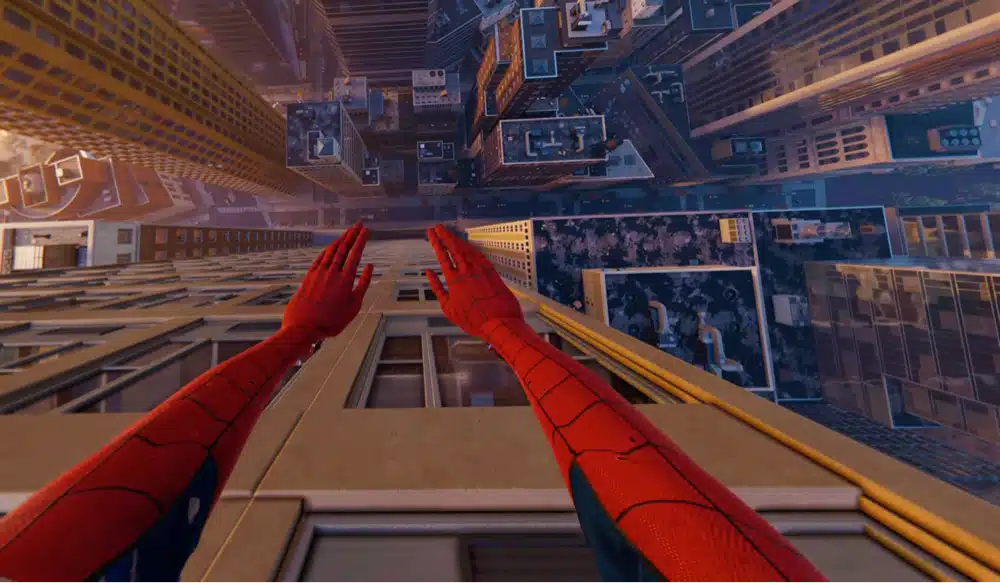
The Spider-Man Remastered VR mod is a project called Spidy. According to its GitHub page, it loads into the running game, draws two extra views through the game’s own renderer (one per eye), and hands them to OpenXR. The swinging uses Spidy’s own rope physics, while the webs you see, the web shooter and the punches are the game’s own systems fed by your tracked hands.
The developer lists these features as working:
- Physical web swinging. Squeeze a grip to fire that hand’s web where you point, swing on it, reel in with the trigger, and pull sharply to zip
- A web shooter on your wrist that fires the game’s own web ball, with aim assist on enemies
- Grabbing and throwing props and enemies on a web
- Real punches, with a ring that marks your target and an arrow that calls the next blow (a hook, an uppercut or a blow down)
- Walking and running on walls, with your view turning so the wall becomes your floor
- A full Spider-Man body that follows your controllers, sized to your height with a quick T-pose
- A SPIDY VR tab in the game’s own Settings, plus cutscenes and menus shown on a screen in the headset
Spidy vs the Luke Ross Spider-Man VR Mod
Spidy isn’t the first Spider-Man VR mod. In 2023, VR modder Luke Ross released a Spider-Man mod for Spider-Man Remastered and Miles Morales as a perk on his Patreon, at around 11 euros a month plus VAT.
The practical difference: Spidy is free and built around physical arm-swinging and punching. The two also can’t coexist. Spidy’s launcher detects the R.E.A.L. VR mod’s files in the game folder (dxgi.dll, RealVR.ini and others) and refuses to start VR until you move them out.
Spider-Man Remastered VR Mod Requirements
- A Windows PC. Linux runs Spidy inside the game’s Steam Proton session, which the developer calls experimental
- Marvel’s Spider-Man Remastered on Steam, purchased and installed
- A PC VR headset with an OpenXR runtime (a Quest 3 with Virtual Desktop, Steam Link, or any SteamVR headset)
- About 19 GB of memory Windows can give programs (RAM plus page file). On a 16 GB PC that means a healthy page file, so check it before blaming the mod for a crash
- The Microsoft Visual C++ runtime, which the launcher can install for you
Which Version of Spider-Man Remastered Works With the VR Mod?
Only the Steam version, at game version 4.630.0.0, works with this VR mod. The Epic Games Store version is a different build and doesn’t work.
The developer also warns that Spidy reads the game’s code at fixed places, so a future game update needs a Spidy update. If the launcher says “This game version is not supported,” see the fixes below.
Spider-Man Remastered VR PC Specs and VRAM
The Spidy page doesn’t list a minimum graphics card. Steam lists a GTX 1060 6GB or RX 580 8GB as recommended for the flat game, and VR renders the world twice at your headset’s resolution, so I’d treat that as a floor.
The developer’s only published benchmark is an RTX 4080 laptop, which ran about 61 frames per second at the default Quality upscaling, 77 at Performance, and 39 with upscaling off. The launcher also starts the game with the larger render memory VR needs, which is why you should always launch from it.
Spider-Man Remastered VR Mod Download: Which Spidy Release to Get
Download the newest zip from the Spidy releases page on GitHub. At the time of writing that is Spidy-0.3.6-win64.zip. This is the only official download, so skip reupload sites and video descriptions that point elsewhere. The developer asks that anyone sharing it keep the original release zip and its credit intact.
You don’t need to chase new versions by hand. When the launcher starts, it checks GitHub and offers an Update now button that downloads the new build, keeps your settings, and restarts itself.
How to Install the Spider-Man Remastered VR Mod (Step by Step)
The install is one zip and one launcher. Spidy changes nothing in the game’s folder, so removing it is as simple as deleting its own folder.
Step 1: Check You Have the Steam Version Installed
Install Spider-Man Remastered from Steam and let it finish updating. If you ever opted into one of the game’s rollback betas, switch back: right-click the game in Steam, choose Properties, then Betas, then None. Also move any R.E.A.L. VR files out of the game folder if you tried that mod before.
Step 2: Download the Spidy Zip From GitHub
Grab the zip from the latest release and extract the whole thing to a folder you can write to, such as Documents\Spidy. Don’t run it from inside the zip. If files go missing after extracting, your antivirus is probably objecting to a tool that attaches to a running game, so allow the Spidy folder and extract again.
Step 3: Start Spidy Launcher and Fix Anything Red
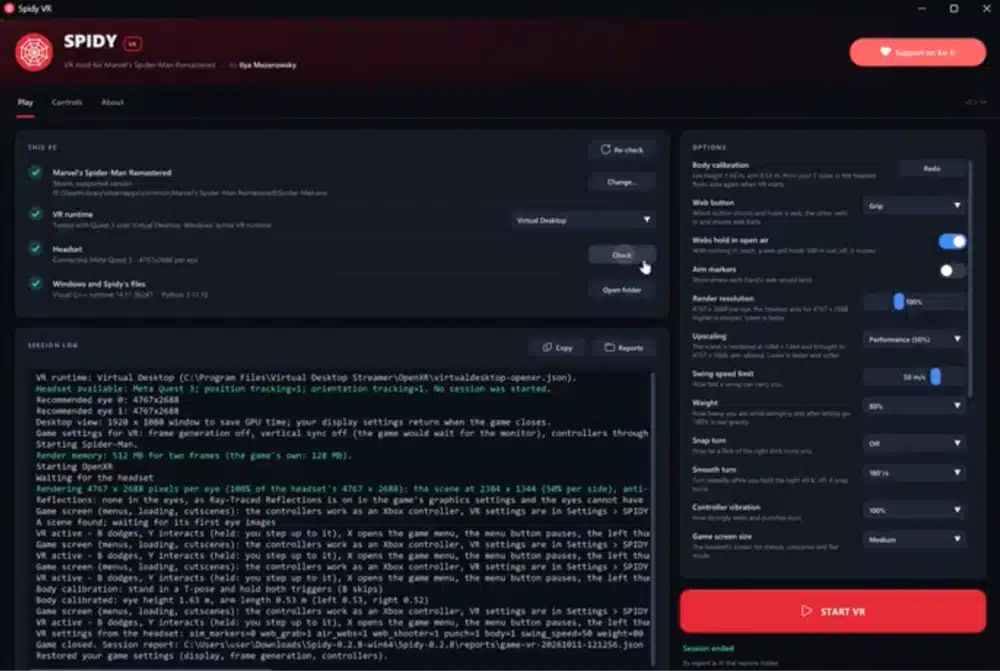
Open Spidy Launcher.exe. Windows may say it protected your PC because Spidy isn’t signed by a company. Choose More info, then Run anyway. The launcher checks for the game, your VR runtime, your headset and your memory. Fix anything marked red, and use Add shortcuts if you want Spidy VR on your desktop and Start menu.
Step 4: Connect Your Headset and Press START VR
Close the game if it’s running, connect your headset to the PC, and press START VR. Steam launches the game, and its intro and menus appear on a screen in the headset. Pick your save with the VR controllers and VR takes over as soon as you start playing.
Keep the game window in front on your desktop, because the game pauses when another window covers it, the launcher included. If the headset shows a still picture, click the game window once. VR starts once per game launch, so to play again after STOP VR, close the game first.
Step 5: Calibrate Your Body With a T-Pose
The first time, a panel asks you to calibrate. Stand tall, look ahead, stretch both arms straight out to your sides and hold both triggers until the bar fills, about a second and a half. Spider-Man then has your height and arm length, so his hands sit where your controllers are. Press B to skip it, and redo it later from the launcher or from CALIBRATE BODY in the SPIDY VR settings tab.
How to Play Spider-Man VR on Meta Quest 3 (Virtual Desktop or Steam Link)
The Quest 3 is the headset the developer actually tested, over both Virtual Desktop and SteamVR through Steam Link. Connect the headset to your PC first, then press START VR in the launcher. If you’re new to the setup, my guides to Virtual Desktop on Meta Quest and Steam Link on Meta Quest walk through each one.
Two things from the developer’s notes matter for a wireless Quest. If the picture freezes or jumps for a second or two, connect the PC to your router with a network cable and turn the PC’s Wi-Fi off, because a PC on Wi-Fi sends every picture through the air twice. And 90 Hz paces more evenly than 120 Hz. Meta Quest Link should work too, but it isn’t listed as tested.
Spider-Man VR on Valve Index, Steam Frame and Other Headsets
Start SteamVR first, then press START VR. The developer says other SteamVR headsets should work, but only the Quest 3 is listed as played. Steam Frame controllers get their own button layout in recent builds: A, B, X and Y sit on the right controller, and the launcher log says “Controllers: Steam Frame, with their own layout” when it’s in use. If you see “the Touch layout” instead, open SteamVR, go to Settings, then Controllers, then Manage Controller Bindings, and pick the game’s default binding.
If SteamVR doesn’t appear in the launcher’s runtime list on an older build, open SteamVR, go to Settings, then OpenXR, and press Set SteamVR as OpenXR runtime. Newer builds find it on their own. I haven’t seen PSVR2 or Pimax listed as tested, so treat those as unconfirmed.
Spider-Man Remastered VR Controls: Web Swinging, Punching and Walls
These are the defaults from the developer’s controls table for Touch-style controllers.
| Action | Control |
|---|---|
| Shoot a web and swing | Squeeze a grip, release to let go |
| Reel in | Trigger, while that hand’s web is attached |
| Zip | Pull the hand sharply away from the anchor |
| Shoot a web ball | Trigger of a hand with no web attached |
| Grab and throw a prop or enemy | Aim a grip at it, reel with the trigger, release to throw |
| Punch | A fast fist into an enemy |
| Walk and run | Left stick |
| Jump (hold for a charged leap) | A |
| Dodge | B, in the direction of the left stick |
| Interact | Y, looking at the thing within about a metre |
| Turn | Right stick (30 degree snap by default) |
| Game menu (map, suits, skills) | X |
| Pause and VR settings | Menu button |
| Scan | Raise a hand to your temple and pull its trigger |
| Slow motion | Click the left stick |
You can swap the web button so the trigger shoots and the grip reels. Set WEB BUTTON to TRIGGER in the SPIDY VR settings or in the launcher. Open the settings by pressing the Menu button, choosing Settings, then SPIDY VR, the last tab.
Spider-Man VR Mod Combat: Punches, Web Strikes and Called Blows
The developer describes the fighting as web strikes, “as in Batman: Arkham Shadow.” A ring marks the enemy your next punch goes to (the one you look at, up to 10 metres away), and from your second blow on an arrow tells you which way to swing: a hook from the side, an uppercut from below, or a blow down from above. A yellow arrow calls the finisher. Punch at an enemy out of reach and you fly to him, and the blow lands as you arrive.
This quick-time-event style system works surprisingly well in virtual reality even though it isn’t fully tuned. The mod is a little amateur but with massive potential.
Best Spider-Man Remastered VR Settings for Performance
Start with the launcher’s Upscaling option. The game itself anti-aliases and upscales each eye’s view, and its own DLSS, FSR or XeSS setting does not reach the headset, so toggling DLSS in the game’s menu won’t change what you see in VR. Use the launcher’s option instead.
- Low frame rate: set Upscaling to Balanced or Performance, then lower Render resolution or the streaming quality in Virtual Desktop
- Blurry edges: set Upscaling to High or Off, then raise Render resolution above 100% (try 125%), knowing both cost frame rate and memory
- On a laptop, plug it in and choose its highest performance mode
- Reflections: turn Screen Space Reflections on in the game’s graphics settings if you want wet streets and glass to mirror the city. Ray-Traced Reflections never reach the headset, so the launcher turns them off for the session
- Monitor frame rate: the launcher’s option for how often the desktop window shows your left eye. Lower values give the headset a little more GPU time
The launcher also starts the game without frame generation or vertical sync, sets the game’s Aspect Ratio to Auto, and restores your own settings when the game closes. You don’t need to change those by hand.
Spider-Man VR Motion Sickness: Comfort Tips
Swinging through a city at speed is about as intense as VR locomotion gets. In the footage I watched, flips and long falls looked rough, and one player in a video called an earlier build surreal, like a nightmare. Spidy has several comfort options, and if you’re prone to nausea, I’d start with these:
- Leave FLIPS off. It’s an experimental setting that’s off by default
- Keep snap turning on, which is the default at 30 degrees, instead of switching to SMOOTH TURN
- Lower the swing speed limit in the SPIDY VR tab, and try the weight setting too (one reviewer said a heavier setting changes how fast you fall and the arc of a swing)
- Turn STAND ON WALLS off if the view rotating on walls bothers you. You then stay upright beside the wall
- Use a steady frame rate over a high one. Dropping Upscaling to Balanced is better than playing at an uneven 40 frames per second
For general advice, see my guide on how to overcome VR motion sickness.

Spider-Man VR Mod Not Working? Fixes for Common Problems
These are the failures the developer documents, along with the fix for each.
“This Game Version Is Not Supported”
You’re on an older game version, a rollback beta, or a changed Spider-Man.exe. In Steam, right-click the game, choose Properties, then Betas, then None, then Installed Files, then Verify integrity of game files. A newer game version than 4.630.0.0 needs a Spidy update.
The Headset Is Not Found
Connect the headset first (and start SteamVR for SteamVR headsets), then press Check in the launcher. If it picks the wrong runtime, choose yours from the VR runtime list.
“VR Needs Administrator Rights”
Steam or the game is running as administrator, so Windows keeps Spidy out. Choose Restart as administrator when the launcher asks, close the game, and press START VR. If nothing changes, allow the Spidy folder in your antivirus.
The Headset Stays Black or the Game Closes as VR Starts
Two documented causes. First, another VR mod’s dxgi.dll sits next to Spider-Man.exe (the R.E.A.L. VR mod does this), and Steam’s file check won’t remove it, so move those files out by hand. Second, the game’s Aspect Ratio was set to a fixed shape, which the launcher now sets to Auto during VR. Other tools that load from the game folder, such as ReShade, only trigger a warning and VR still starts.
Buttons Do Nothing in VR, or Menus Ignore the Controllers
If webs and walking work but menus, doors and web strikes don’t, Steam Input is on for the game. In Steam, right-click the game, choose Properties, then Controller, then Disable Steam Input, close the game and press START VR. Also keep the game window in front and always start the game from the launcher.
The Picture Breaks Up or Freezes
Close the game and start it from the launcher, which gives it the larger render memory VR needs. A game launched on its own and attached afterwards can’t get it. For stalls on a wireless headset, use a network cable for the PC as described above.
If none of that helps, attach the newest file from the launcher’s reports folder and ask in the Spidy Discord, where the developer posts releases and answers setup questions.
Spider-Man Miles Morales VR Mod and Spider-Man 2 VR Mod: Do They Exist?
Spidy’s page names Marvel’s Spider-Man Remastered only. It doesn’t list Miles Morales or Marvel’s Spider-Man 2, so I’d assume neither works.
Luke Ross’s older mod did cover Miles Morales, per the 2023 report above, and the Spidy GitHub page says tips fund more full VR conversions, though it doesn’t name another game. I found no working Spider-Man 2 VR mod while researching this.
Other Spider-Man VR Options (Including Bonelab)
If your PC can’t run the mod, or you want something you can play on a standalone Quest, there are alternatives. The official Spider-Man VR games are covered in my best Spider-Man VR games list. And if you search for a Spider-Man VR mod for Bonelab, that’s a different thing: character and avatar mods inside another game, which I round up in my best Bonelab mods guide.
For other full flat-to-VR conversions that install the same way, see my guides to the Titanfall 2 VR mod, the F.E.A.R. VR mod and the DOOM Eternal VR mod.
Is the Spider-Man Remastered VR Mod Worth Playing?
Yes, if you already own the game and have a PC that can drive a headset, because it costs nothing to try. Web swinging is the highlight in both reviewer videos, and one of them praised the draw distance and detail of the city. The caveats: it’s an early alpha, you shouldn’t expect to finish the whole story in VR yet, and a reviewer on 0.3 said gadgets weren’t usable and a story mission’s quick-time event needed the keyboard. Check the changelog on GitHub before you decide whether those limits still apply.
I’d skip it if you’re on a standalone Quest with no PC, if you bought the game on Epic, or if you get queasy with fast locomotion and don’t want to tune the comfort settings.
Spider-Man Remastered VR Mod FAQ
Is the Spider-Man VR mod free?
Yes. Spidy is free and open source under the GPL-3.0 license, and every release is on GitHub. You still need to own Marvel’s Spider-Man Remastered on Steam, which is a paid game. The developer accepts optional tips on Ko-fi.
Is the Spider-Man Remastered VR mod safe?
The source code is public on GitHub under a GPL-3.0 license, so you can inspect it. Windows will warn you because the program isn’t signed by a company, and some antivirus programs dislike tools that attach to a running game. Only download it from the SpidyVR releases page on GitHub, and don’t use it for anything online.
Can you play Spider-Man VR on Meta Quest 3 without a PC?
No. The mod runs on a Windows PC, and the Quest streams the game from it through Virtual Desktop or Steam Link. The Quest 3 is the headset the developer tested. If you want a standalone Quest option, see the official Spider-Man VR games in my roundup.
Does the Spider-Man VR mod work with Miles Morales?
Spidy’s page names Spider-Man Remastered only, so I would assume it does not. Luke Ross’s older paid mod covered Miles Morales, according to a 2023 report, but I could not confirm that it is still available.
Is there a Spider-Man 2 VR mod?
I found none while researching this guide. Spidy does not list Marvel’s Spider-Man 2 as supported.
Does the Spider-Man Remastered VR mod work on the Epic Games Store version?
No. Spidy supports the Steam version only, at game version 4.630.0.0. The Epic version is a different build.
Can you play Spider-Man Remastered in VR on PS5?
Not with this mod. Spidy is a Windows PC mod, with Linux through Steam Proton listed as experimental. It does not run on a PlayStation.
Can you play the whole Spider-Man game with the VR mod?
The developer calls it an early alpha. One reviewer on an early 0.3 build said gadgets weren’t usable and a quick-time event in a story mission needed the keyboard, so I would not expect a smooth full playthrough yet. Check the changelog on GitHub for what has changed since.
Is the Spider-Man VR mod the same as the first-person Spider-Man mod?
No. The 2023 first-person mod changed the camera on a flat screen. Spidy renders a separate view for each eye, tracks your head and hands, and replaces swinging and fighting with arm-controlled webs and real punches.
Can I use the Spider-Man VR mod with other mods like ReShade?
Other tools that load from the game folder, ReShade for one, get a warning in the session log and VR still starts. The R.E.A.L. VR mod is the exception, because its files stop Spidy from starting VR until you move them out of the game folder.
Final Thoughts
The Spider-Man Remastered VR mod is a free way to swing around the open-world game in a headset. Setup takes a few minutes: install the Steam game, extract the Spidy zip, run the launcher and press START VR.
My advice is to start with the Quest 3 or SteamVR route the developer tested, keep flips off at first, and check the Spidy releases page every so often, because builds are arriving every day or two. If you want to try more mods like this, start with the Titanfall 2 VR mod.